
Total 234 Questions
Last Updated On : 6-Oct-2026

What execution model is used by For Each and Batch Job scopes?
A. For Each is single-threaded and Batch Job is multi-threaded
B. Both are single-threaded
C. Both are multi-threaded
D. Batch Job is single-threaded and For Each Is multi-threaded
Explanation:
In Mule 4, the For Each scope processes each element of a collection sequentially in a single thread, preserving the order of items and ensuring thread safety for operations within the loop. In contrast, the Batch Job scope is designed for processing large volumes of records asynchronously and in parallel using multiple threads, which improves performance for high-volume data processing tasks.
Key Concepts Tested:
Understanding of For Each scope execution (synchronous, single-threaded)
Understanding of Batch Job scope execution (asynchronous, multi-threaded)
Differences between iterative processing vs. batch processing in Mule
Threading behavior in Mule runtime
Reference:
MuleSoft Documentation: For Each Scope — processes items one by one in the same flow thread.
MuleSoft Documentation: Batch Job Processing — splits records into batches and processes them using multiple threads for parallel execution.
Analysis of Other Options:
Option B (Both are single-threaded): Incorrect. Batch Job is explicitly designed to be multi-threaded to handle large datasets efficiently.
Option C (Both are multi-threaded): Incorrect. For Each is explicitly single-threaded and processes items in sequence.
Option D (Batch Job is single-threaded and For Each is multi-threaded): Incorrect. This is the exact opposite of the correct behavior.
What is the default port used by Mule application debugger configuration in Anypoint Studio?
A. 8082
B. 8080
C. 7777
D. 6666
Explanation:
When debugging Mule applications in Anypoint Studio, the IDE launches the Mule runtime in debug mode and attaches a remote debugger. This requires a specific port to be opened so that the debugger can connect to the Mule runtime process. By default, Anypoint Studio uses port 7777 for this purpose.
Here’s how it works:
When you start a Mule application in debug mode, Anypoint Studio configures the Mule runtime to listen for debugger connections on port 7777.
The IDE then attaches to this port to allow developers to set breakpoints, inspect variables, and step through the flow execution.
This port is configurable, meaning you can change it if needed (for example, if 7777 is already in use by another process). However, unless explicitly modified, 7777 remains the default.
Now let’s analyze why the other options are incorrect:
A. 8082 – This is often used as the default HTTP listener port for Mule applications, not for debugging. It allows flows to accept incoming HTTP requests but has nothing to do with the debugger configuration.
B. 8080 – This is a common default port for web servers (like Tomcat or other HTTP services). Mule applications can use 8080 for HTTP listeners, but it is not the debugger port.
D. 6666 – This is not associated with MuleSoft debugging. It may be used by other applications, but MuleSoft does not assign 6666 as a default debugger port.
Thus, the correct answer is 7777, which is the default debugger port in Anypoint Studio. Developers should remember this for troubleshooting scenarios, especially when debugging fails due to port conflicts or firewall restrictions.
📚 References
MuleSoft Docs: Debug Mule Applications in Anypoint Studio
MuleSoft Help Center: Default Debugger Port Configuration
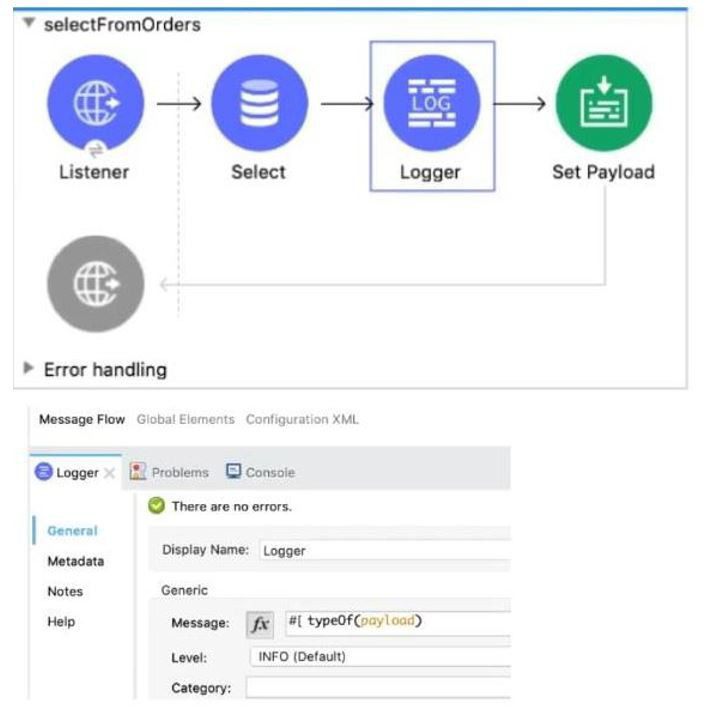
Refer to the exhibit. What is the output of logger component?
A. String
B. Object
C. Array
D. Map
Explanation:
The flow processes data through three components before reaching the Logger:
Listener: This component receives the inbound request and starts the flow.
Select (Database Connector): This component executes a database query (implied by the name and icon). In Mule 4, when the Database Select operation executes a query, the output payload is, by default, a list of maps (or objects), where each map represents a row returned from the database. This data structure is represented in DataWeave as an Array (of Objects).
Logger: This component's configuration uses the DataWeave expression:
$$#[typeOf(payload)]
The typeOf() function inspects the data type of the current payload.
Since the payload entering the Logger is the default output of a Select database operation, which is an Array of records, the typeOf(payload) function will return the String value representing the array type (e.g., "Array" or a more specific array type string).
The question asks for the output of the logger component, which is the value of the message it logs. The value being logged is the string name of the payload's type, which is Array. Therefore, the conceptual output logged by the component is related to the Array data type. In the context of a multiple-choice exam asking about the result of typeOf(payload) after a database select, the expected answer is the type of the payload itself, which is an Array.
❌ Incorrect Answers:
A. String: A String is the literal output of the typeOf() function (e.g., the string "Array"), but the question implies what type the payload is. The payload itself is an Array.
B. Object: An Object (Map) represents a single record. Since the database select operation returns multiple rows, the overall payload is a collection of these objects, i.e., an Array.
D. Map: A Map is the Mule/DataWeave representation of a single key-value pair structure, which is what each item in the array is. The overall payload, however, is an Array of these Maps.
📚 References:
For detailed information on the default output structure of database operations, refer to the official MuleSoft documentation:
Database Connector Output: The documentation for the Select operation of the Mule 4 Database Connector states that the output message payload is typically a List
DataWeave typeOf() Function: This function returns the type of the value it is called on. The value being inspected is the list of records (Array) returned by the database operation.
A company has an API to manage purchase orders, with each record identified by a unique purchase order ID. The API was built with RAML according to MuleSoft best practices.
What URI should a web client use to request order P05555?
A. /orders/{P05555}
B. /orders/order=P05555
C. /orders?order=P05555
D. /orders/P05555
Explanation:
According to MuleSoft best practices and RESTful API design principles (as defined in RAML specifications), resources in APIs are organized hierarchically. For a collection resource like /orders (representing all purchase orders), a specific sub-resource (a single order identified by a unique ID like "P05555") is accessed by appending the ID directly to the collection URI using a path parameter. This follows the standard REST pattern for singular resource retrieval:
/collection/{identifier}
Here, the URI /orders/P05555 correctly identifies the specific order resource. The {P05555} in RAML would be defined as a URI parameter (e.g., uriParameters: orderId: type: string), allowing dynamic substitution. This is the cleanest, most readable, and scalable approach for resource identification without introducing unnecessary query strings or equals signs.
Why the other options are incorrect:
A. /orders/{P05555} → Wrong. This is the RAML template syntax for defining the URI with a placeholder, not the actual URI a client should use. Clients replace the placeholder with the real value (e.g., /orders/P05555).
B. /orders/order=P05555 → Wrong. This uses an equals sign (=) in the path, which is not standard REST practice and resembles malformed query string syntax. It would require a non-standard URI parameter definition in RAML.
C. /orders?order=P05555 → Wrong. This uses a query parameter (?order=P05555), which is appropriate for filtering/searching a collection (e.g., multiple orders matching criteria), not for retrieving a specific resource by its unique ID. Query params are optional and not ideal for required identifiers.
References:
MuleSoft Docs – RAML API Design Best Practices:
(“Use path parameters for unique resource identifiers, e.g., /orders/{orderId}.”)
MuleSoft Docs – REST API Design Guidelines:
(“For retrieving a single resource: /resource/{id} – avoids query params for primary keys.”)
Answer: D
How many Mule applications can run on a CloudHub worker?
A. At most one
B. At least one
C. Depends
D. None of these
Explanation:
In MuleSoft’s CloudHub deployment model, a worker is the dedicated runtime instance that executes a Mule application. Each worker provides a certain amount of vCPU and memory resources, depending on the chosen worker size. Workers are isolated environments designed to run a single Mule application to ensure stability, scalability, and fault isolation.
By design, each CloudHub worker can run only one Mule application at a time. This is a strict limitation enforced by MuleSoft to guarantee that applications do not compete for resources within the same worker. If you want to deploy multiple Mule applications, you must provision additional workers. For example, if you need three applications running simultaneously, you must allocate at least three workers (one per application).
This architecture provides several benefits:
Isolation: Each application runs independently, reducing the risk of one application’s failure affecting another.
Scalability: Applications can be scaled horizontally by adding more workers.
Resource allocation: Each worker’s CPU and memory are dedicated to a single application, ensuring predictable performance.
Operational simplicity: Monitoring, logging, and managing applications is easier when each worker hosts only one application.
❌ Why the Other Options Are Incorrect
B. At least one – Misleading. While technically true, MuleSoft’s documentation specifies at most one application per worker, not “at least.”
C. Depends – Incorrect because it does not depend on configuration; the rule is strict: one worker → one application.
D. None of these – Incorrect because the correct answer is explicitly listed: at most one.
📚 References
MuleSoft Docs: CloudHub Workers
MuleSoft Docs: Deploying Applications to CloudHub
Trailhead: Deploy Mule Applications to CloudHub
Refer to the exhibits.
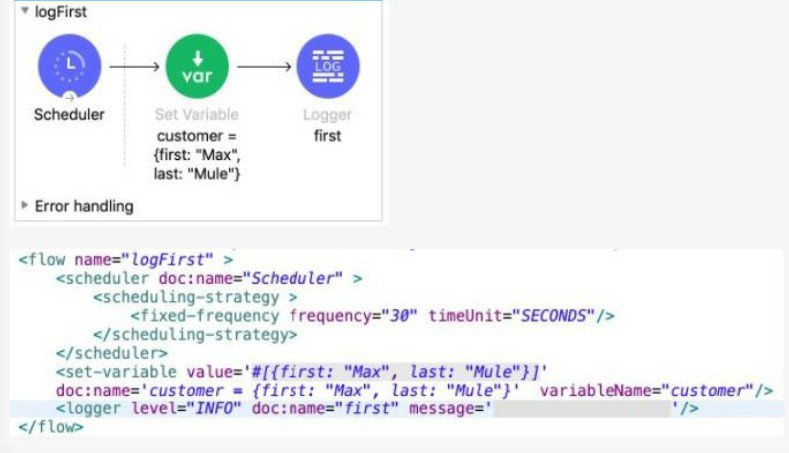
The Set Variable transformer is set with value #[ [ first "Max" last "Mule"} ].
What is a valid DataWeave expression to set as the message attribute of the Logger to access the value "Max" from the Mule event?
A. vars "customer first"
B. "customer first"
C. customer first
D. vars "customer" "first"
Explanation:
The Set Variable component sets a variable named customer to a Map (Object) value:
$$#[{ first: "Max", last: "Mule" }]$$
This means:
vars.customer is equal to {first: "Max", last: "Mule"}
To access the value "Max" from the Logger's message attribute using DataWeave, you need to:
Access the Variable: Use the vars keyword to access the variable scope, followed by the variable name, e.g., vars.customer.
Access the Key: Since the variable value is a Map, you access its key (first) using the Map accessor syntax.
DataWeave 2.0 offers a shorthand syntax for accessing nested keys in maps (and variables/attributes which are treated as maps) using dot notation or space notation (path selectors):
Dot Notation (Standard): vars.customer.first
Space Notation (Shorthand): vars customer first (This is option A without the quotes, but DataWeave often permits omission of quotes for simple string keys)
Since option A. vars "customer first" is the only one that correctly identifies the vars scope, the variable name (customer), and the key (first) in a way that DataWeave understands (treating the space as a path/field selector), it is the correct way to form the expression. The expression is interpreted as: Access the variable scope (vars), then the variable named customer, then the key first.
❌ Incorrect Answers
B. "customer first": This is just a literal String and would not access the variable value.
C. customer first: This is invalid syntax. DataWeave requires you to specify the scope (vars.) or attributes (attributes.) to access flow variables. If you omit the scope, it defaults to payload, which is incorrect here.
D. vars "customer" "first": This syntax is incorrect. While it uses vars, separating the variable name and the key with quotes like this is not standard DataWeave path selector syntax. The simplest and most direct path selector notation is vars customer first or vars.customer.first. Option A is the closest valid representation of the correct path selector.
📚 References
For detailed information on accessing flow variables and Map keys in DataWeave 2.0, refer to the official MuleSoft documentation:
DataWeave Variables Access: The documentation confirms that variables are accessed using the vars keyword, typically using dot notation (vars.variableName) or path selectors.
DataWeave Path Selectors: DataWeave path selectors allow for key access using dot notation (map.key) or space notation (map key), making expressions like vars customer first valid for navigating nested structures.
What MuleSoft product enables publishing, sharing, and searching of APIs?
A. Runtime Manager
B. API Notebook
C. API Designer
D. Anypoint Exchange
Explanation:
Anypoint Exchange is the MuleSoft platform component specifically designed for publishing, sharing, discovering, and reusing APIs, templates, connectors, examples, and other assets across an organization. It acts as a central catalog where developers and business users can search for available APIs, view documentation, and reuse assets to accelerate development.
Key Concepts Tested:
Role of Anypoint Exchange in the API lifecycle
Understanding of different components in the Anypoint Platform
Collaboration and reuse of API assets
Reference:
MuleSoft Documentation: Anypoint Exchange is a library for sharing and discovering APIs, templates, and other reusable assets.
Analysis of Other Options:
A. Runtime Manager: Incorrect. Runtime Manager is used for deploying, managing, and monitoring Mule applications and APIs across runtimes (CloudHub, on-premises, etc.), not for publishing or sharing APIs.
B. API Notebook: Incorrect. API Notebook is a tool for interactive API documentation and testing, allowing users to try out API calls directly in the browser. It does not enable publishing, sharing, or searching of APIs at scale.
C. API Designer: Incorrect. API Designer is a tool for designing and creating API specifications (RAML/OAS). While it integrates with Exchange, its primary purpose is design, not the centralized publishing and searching of APIs.
Refer to the exhibits.
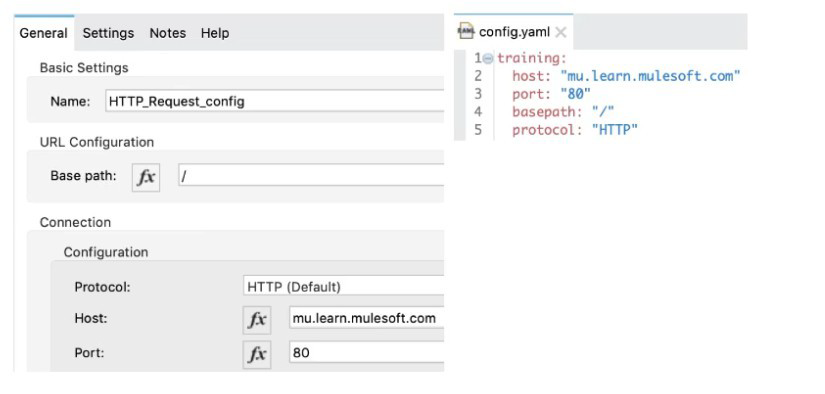
A Mule application has an HTTP Request that is configured with hardcoded values. To change this, the Mule application is configured to use a properties file named config.yaml.
what valid expression can the HTTP Request host value be set to so that it is no longer hardcoded?
A. ${training.host}
B. ${training:host}
C. #[training:host]
D. #[training.host]
Explanation:
When configuring a Mule application to read dynamic values from a properties file (like config.yaml), the standard syntax for property placeholders is used:
Syntax: The correct syntax to reference a property is ${property.name}.
Configuration File (config.yaml): The exhibit shows the config.yaml file with the following structure:
training:
host: "mu.learn.mulesoft.com"
port: "80"
basepath: "/"
protocol: "HTTP"
Property Path: In YAML, the structure creates nested properties. To access the host value, you traverse the keys: training followed by host. These are separated by a dot (.). The full property name is therefore training.host.
Application Configuration: When setting the Host value in the HTTP Request Configuration, you place the full property name within the placeholder syntax: ${training.host}. The Mule runtime will automatically resolve this expression to the string value "mu.learn.mulesoft.com" defined in the config.yaml.
❌ Incorrect Answers:
B. ${training:host}: The colon (:) is not the standard separator for nesting properties in Mule's property placeholder syntax; the dot (.) is used for nested keys in YAML/properties files.
C. #$$training:host$$: This uses the DataWeave expression syntax (#[...]), which is generally reserved for data manipulations, accessing message elements (payload, variables, attributes), or invoking DataWeave functions. Property placeholders should use the ${...} syntax.
D. #$$training.host$$: This also uses the DataWeave expression syntax (#[...]). While DataWeave can read configuration properties using the p() function (e.g., p('training.host')), the simplified and standard way to reference a configuration property directly in a field like the HTTP Request's Host is the placeholder syntax ${...}.
📚References:
For detailed information on configuring properties in Mule applications, refer to the official MuleSoft documentation:
Mule Configuration Properties: The documentation confirms that properties in configuration files are referenced using the ${property.name} placeholder syntax.
YAML and Properties: This documentation also verifies that nested keys in YAML files are referenced using dot notation (e.g., parent.child) when accessed as configuration properties in Mule.
According to Semantic Versioning, which version would you change for incompatible API changes?
A. No change
B. MINOR
C. MAJOR
D. PATCH
Explanation:
According to Semantic Versioning (SemVer) standards:
MAJOR version increment (X.0.0) indicates incompatible API changes.
MINOR version increment (0.X.0) indicates new functionality added in a backward-compatible manner.
PATCH version increment (0.0.X) indicates backward-compatible bug fixes.
When you make changes to an API that break existing client compatibility (changing required fields, removing endpoints, changing response structures, etc.), you must increment the MAJOR version number.
Key Concepts Tested:
Semantic Versioning (MAJOR.MINOR.PATCH)
API versioning best practices
Understanding backward-compatible vs. breaking changes
Reference:
Semantic Versioning Specification (semver.org): MAJOR version for incompatible API changes.
Analysis of Other Options:
A. No change: Incorrect. Incompatible changes must be versioned to prevent breaking existing clients.
B. MINOR: Incorrect. MINOR version is for backward-compatible new features.
D. PATCH: Incorrect. PATCH version is for bug fixes that don't affect API compatibility.
A RAML specification is defined to manage customers with a unique identifier for each customer record. What URI does MuleSoft recommend to uniquely access the customer identified with the unique ID 1234?
A. /customers?custid=true&custid=1234
B. /customers/1234
C. /customers/custid=1234
D. /customers?operation=get&custid=1234
Explanation:
MuleSoft and industry best practices for RESTful API design recommend structuring URIs to model business entities and their relationships:
Collection Naming: The collection of resources (all customer records) is represented by the plural noun /customers.
Unique Resource Identification (Path Parameter): A specific, single resource within that collection is accessed by appending its unique identifier directly as a path segment.
The typical structure defined in RAML is /collection/{resourceId}, which is realized in a request as: /customers/1234.
This approach is intuitive and clearly identifies the specific customer record.
❌ Incorrect Answers
A. /customers?custid=true&custid=1234: This uses Query Parameters. Query parameters are best used for filtering, sorting, or pagination of a collection (/customers?status=active), not for uniquely identifying the resource itself.
C. /customers/custid=1234: This is a mixing of path segment and query parameter syntax, resulting in a non-standard and less intuitive URI.
D. /customers?operation=get&custid=1234: This violates the fundamental REST principle that the HTTP method (GET) defines the operation, not a query parameter (?operation=get).
📚References
MuleSoft REST API Design Best Practices: The documentation and training materials consistently promote using resource-based URLs and path parameters (e.g., GET /customers/{id}) for accessing unique resources, as opposed to using query parameters (e.g., GET /customers?id=123).
| Page 3 out of 24 Pages |
| 12345678 |
| Salesforce-MuleSoft-Developer Practice Test Home |
Our new timed 2026 Salesforce-MuleSoft-Developer practice test mirrors the exact format, number of questions, and time limit of the official exam.
The #1 challenge isn't just knowing the material; it's managing the clock. Our new simulation builds your speed and stamina.
You've studied the concepts. You've learned the material. But are you truly prepared for the pressure of the real Salesforce Certified MuleSoft Developer - Mule-Dev-201 exam?
We've launched a brand-new, timed Salesforce-MuleSoft-Developer practice exam that perfectly mirrors the official exam:
✅ Same Number of Questions
✅ Same Time Limit
✅ Same Exam Feel
✅ Unique Exam Every Time
This isn't just another Salesforce-MuleSoft-Developer practice questions bank. It's your ultimate preparation engine.
Enroll now and gain the unbeatable advantage of:

Copyright © - All Rights Reserved