
Total 184 Questions
Last Updated On : 18-Oct-2026

Universal Containers needs to create a custom user interface component that allows users to enter information about their accounts. The component should be able to validate the user input before saving the information to the database. What is the best technology to create this component?
A. Flow
B. Lightning Web Components
C. Visualforce
D. VUE JavaScript framework
Explanation:
Lightning Web Components is Salesforce's modern, standards-based UI framework for building components on the Lightning Platform. It is the recommended approach for creating custom UI on Salesforce today due to its performance, reusability, and use of modern web standards like HTML, CSS, and JavaScript.
Validation in LWC is straightforward and can be implemented in two ways:
➡️ Built-in Validation: Base components like
➡️ Custom Validation: For more complex business logic, you can write JavaScript to perform custom validation checks. You can use methods like checkValidity() and reportValidity() on the input fields to display user-friendly error messages before the data is processed or saved.
Why the Other Options Are Not the Best Choice?
A. Flow: While Flow can be used to build user interfaces through Screen Flows, it is a declarative tool for automating business processes. It's great for building multi-step wizards or simple forms, but it is not the ideal technology for creating a highly customized, standalone UI component. Flow's validation capabilities are more limited compared to LWC.
C. Visualforce: Visualforce is an older, tag-based framework. While it is still supported and used in many legacy applications, it is generally considered outdated. Salesforce recommends using Lightning Web Components for all new development because they are more performant and align with the modern web development ecosystem.
D. VUE JavaScript framework: Vue is an external, general-purpose JavaScript framework. While it's possible to build a Vue application and integrate it with Salesforce, it's not a native Salesforce technology. This approach would require more effort to set up, secure, and maintain, as you would have to manage the connection to the Salesforce platform, handle authentication, and integrate with the Salesforce Lightning Design System (SLDS) manually. It's not a native component-building solution.
A developer created these three Rollup Summary fields in the custom object, Project_______c: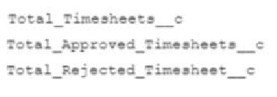
The developer is asked to create a new field that shows the ratio between rejected and approved timesheets for a given project.
Which should the developer use to implement the business requirement in order to minimize maintenance overhead?
A. Record-triggered flow
B. Formula field
C. Apex trigger
D. Field Update actions
Explanation:
Key Point:
We already have roll-up summary fields on the Project object:
➡️ Total_Timesheets__c
➡️ Total_Approved_Timesheets__c
➡️ Total_Rejected_Timesheet__c
Now, the requirement is to calculate the ratio of rejected to approved timesheets.
This is a calculation between fields that already exist → no need to use automation (Flow, Trigger, Workflow).
Options Breakdown:
A. Record-triggered flow ❌
Flows are useful for automations or updating fields based on conditions.
But here, it’s just a simple formula calculation. Using a Flow would add unnecessary maintenance overhead.
B. Formula field ✅
Perfect choice.
You can define a formula like:
Total_Rejected_Timesheet__c / Total_Approved_Timesheets__c
Automatically recalculates whenever the underlying roll-up fields change.
Zero maintenance overhead, because it’s declarative and self-updating.
C. Apex trigger ❌
Triggers are overkill here. You’d only use Apex if the calculation were too complex for formulas.
D. Field Update action ❌
Workflow Field Updates are not suitable because they require additional automation and are being replaced by Flow.
Also, a formula field already solves this directly without extra processes.
✅ Correct Answer:
B. Formula field
Reference:
Salesforce Docs – Formula Fields
A developer created this Apex trigger that calls Myclass.myStaticMethod:
The developer creates a test class with a test method that calls MyClass.myStaticMethod directly, resulting in 81% overall code coverage.
What happens when the developer tries to deploy the trigger and two classes to production, assuming no other code exists?
A. The deployment passes because both classes and the trigger were included in the deployment.
B. The deployment fails because no assertions were made in the test method.
C. The deployment passes because the Apex code has the required >75% code coverage.
D. The deployment fails because the Apex trigger has no code coverage.
Explanation:
Salesforce requires that each Apex trigger is covered by at least 1% code coverage to deploy to production. In your case:
The test method directly calls MyClass.myStaticMethod, which covers the method in the class.
However, the trigger itself is not executed by the test, so the trigger has 0% coverage.
Even though the total coverage is over 75%, individual triggers must have at least some coverage (≥1%).
A development team wants to use a deployment script to automatically deploy to a sandbox during their development cycles. Which two tools can they use to run a script that deploys to a sandbox? Choose 2 answers
A. VSCode
B. Change Sets
C. SFDX CLI
D. Developer Console
Explanation:
A. VS Code ✅
Visual Studio Code (with Salesforce Extensions) can run Salesforce CLI commands and scripts.
You can create deployment scripts (using package.xml, metadata API, etc.) and execute them from VS Code’s terminal.
✅ Correct.
B. Change Sets ❌
Change Sets are a point-and-click tool in the Salesforce UI.
They cannot be scripted or automated — they’re manual.
❌ Incorrect.
C. SFDX CLI ✅
The Salesforce CLI (sfdx) is specifically designed for automation.
You can script deployments using commands like:
sfdx force:source:deploy -u MySandbox -p force-app/main/default
✅ Correct.
D. Developer Console ❌
The Developer Console is mainly for running queries, executing anonymous Apex, and debugging logs.
It has nothing to do with scripted deployments.
❌ Incorrect.
✅ Correct Answers:
A. VS Code
C. SFDX CLI
Reference:
Salesforce CLI Command Reference
Salesforce Extensions for VS Code
A software company is using Salesforce to track the companies they sell their software to in the Account object. They also use Salesforce to track bugs in their software with a custom object, Bug c. As part of a process improvement initiative, they want to be able to report on which companies have reported which bugs. Each company should be able t report multiple bugs and bugs can also be reported by multiple companies. What is needed to allow this reporting?
A. Roll-up summary field of Bug c on Account
B. Junction object between Bug c and Account
C. Lookup field on Bug c to Account
D. Master-detail field on Bug c to Account
Explanation:
- Since each company can report multiple bugs, and each bug can be reported by multiple companies, this is a many-to-many relationship.
- Salesforce does not support direct many-to-many relationships, so a junction object is required to link Bug__c and Account.
- The junction object will have two lookup fields, one to Bug__c and one to Account, allowing flexible reporting on which companies reported which bugs.
❌ Why the other options are incorrect:
A. Roll-up summary field of Bug__c on Account
❌ Only works with master-detail relationships, and only rolls up child data — doesn’t allow many-to-many.
C. Lookup field on Bug__c to Account
❌ This creates a one-to-many relationship: one bug to many accounts is not supported with just one lookup.
D. Master-detail field on Bug__c to Account
❌ Also creates a one-to-many relationship: each bug could belong to only one account.
Key Takeaways:
✅ Junction object (B) is the only way to model many-to-many relationships in Salesforce.
🚫 Other options force one-to-many relationships, violating the requirement.
A developer needs to allow users to complete a form on an Account record that will create a record for a custom object. The form needs to display different fields depending on the user's job role. The functionality should only be available to a small group of users. Which three things should the developer do to satisfy these requirements? Choose 3 answers
A. Create a Dynamic Form,
B. Add a Dynamic Action to the Account Record Page.
C. Create a Custom Permission for the users.
D. Add a Dynamic Action to the Users' assigned Page Layouts.
E. Create a Lightning wet> component.
Explanation:
Let’s look at each option to see which three will work best:
Option A: Create a Dynamic Form
A Dynamic Form lets the developer build a flexible form on a record page, like the Account record. It can show different fields based on rules, such as the user’s job role, using features like field visibility rules. This fits the need to display different fields depending on the role.
It’s a great start for creating the form on the Account page.
Option B: Add a Dynamic Action to the Account Record Page
A Dynamic Action is a button or link on the record page that can start a process, like creating a custom object record. By adding this action to the Account Record Page, users can use the form to create the new record. This ties the form to the Account and makes it easy to access.
It’s perfect for making the functionality available on the right page.
Option C: Create a Custom Permission for the users
A Custom Permission lets the developer control who can use a feature. By creating a permission and assigning it to the small group of users, the developer can restrict access to the form and action. This can be combined with profiles or permission sets to limit who sees or uses it.
This ensures only the right users can access the feature.
Option D: Add a Dynamic Action to the Users' assigned Page Layouts
Page Layouts control how records look for users, but Dynamic Actions are tied to Lightning Record Pages, not traditional layouts. Adding an action here wouldn’t work well because it’s not the modern way to handle this in Salesforce Lightning.
This option is outdated and less effective for this requirement.
Option E: Create a Lightning web component
A Lightning web component is a custom piece of code that can build a form. While it could work, it requires more effort to code, test, and maintain compared to using Dynamic Forms, which are built into Salesforce. It’s also harder to adjust fields based on roles without extra work.
This is overkill when simpler tools like Dynamic Forms can do the job.
Why A, B, and C?
Create a Dynamic Form (A): This builds the form and lets it show different fields based on the user’s job role using built-in rules.
Add a Dynamic Action to the Account Record Page (B): This adds a button on the Account page to start the form and create the custom object record.
Create a Custom Permission for the users (C): This limits the feature to the small group of users by controlling who can see or use the action and form.
Together, these three steps meet all the requirements without extra complexity. The developer can set up the form and action in the Lightning App Builder and use permissions to restrict access, keeping everything easy to manage.
Example Idea:
Imagine the form is like a worksheet on the Account page. For a manager, it shows extra fields like budget details, but for a team member, it shows only basic info. The Dynamic Form handles this switch, the Dynamic Action starts the worksheet, and the Custom Permission makes sure only a few users (like managers) can see it.
Reference:
Salesforce Documentation: Dynamic Forms (explains how to create flexible forms).
Salesforce Documentation: Custom Permissions (covers restricting access).
Salesforce Documentation: Actions in Lightning (details on adding actions to record pages).
Summary:
The developer should create a Dynamic Form (A), add a Dynamic Action to the Account Record Page (B), and create a Custom Permission for the users (C). These three steps will build the form, make it accessible, and limit it to the right users.
A developer needs to implement a custom SOAP Web Service that is used by an external Web Application. The developer chooses to Include helper methods that are not used by the Web Application In the Implementation of the Web Service Class. Which code segment shows the correct declaration of the class and methods?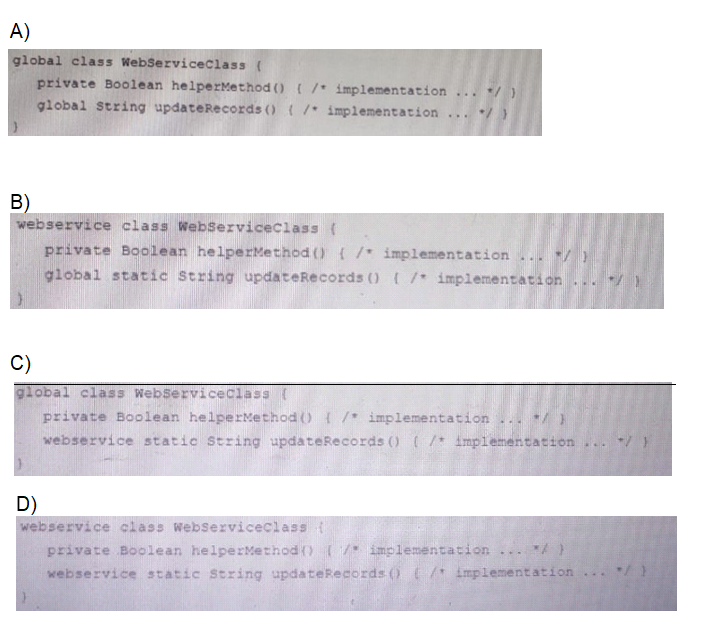
A. Option A
B. Option B
C. Option C
D. Option D
Explanation:
Why Option C is Correct:
The code structure in Option C follows all the mandatory requirements for a SOAP web service class in Salesforce:
1. global class WebServiceClass: A class containing web service methods must be declared as global. This makes the class accessible outside of your Salesforce org's namespace, which is a requirement for any external application to call it.
2. webservice static String updateRecords(): This is the correct syntax for the method that will be exposed as a SOAP endpoint.
→ The webservice keyword is mandatory to expose the method.
→ Web service methods must be declared static.
→ The method must be defined as global or public. (While public works, global is often used for consistency as the class itself is global).
3. private Boolean helperMethod(): This is a perfectly valid way to include a helper method. By declaring it as private, it is hidden from the external web application and can only be used within the class itself. This is a best practice for encapsulation.
❌ Why the Other Options Are Incorrect:
Option A:
→ global with sharing class WebServiceClass → The global modifier is correct.
→ global String updateRecords() → This is incorrect. The method is missing the critical webservice keyword and is not declared as static. Without webservice, it will not be exposed as a SOAP endpoint.
→ global Boolean helperMethod() → While technically possible, making a helper method global unnecessarily exposes it as a public API, which is a bad practice. It should be private.
Option B:
webservice class WebServiceClass → This is fundamentally incorrect. The webservice keyword is only valid for methods, not for classes. A class itself cannot be declared as webservice. This will cause a compilation error.
Option D:
webservice class WebServiceClass → This has the same critical error as Option B. You cannot use webservice as a modifier for a class. This is invalid syntax and will fail to compile.
Reference:
Apex Developer Guide - Defining Apex Web Services: This is the primary source. It explicitly states:
→ "Use the webservice keyword to define these methods."
→ "You must declare web service methods as static."
→ "Any class containing a method defined with the webservice keyword must be declared as global."
→ "If a method is defined with the webservice keyword, you must also declare the method as static."
Which statement should be used to allow some of the records in a list of records to be inserted if others fail to be inserted?
A. Database.insert (records, false)
B. insert records
C. insert (records, false)
D. Database.insert (records, true)
Explanation:
Salesforce provides two ways to perform DML operations:
✅ DML statements (insert records) → If one record fails, the entire operation is rolled back.
✅ Database methods (Database.insert(records, false)) → Allows partial success, meaning successful records are inserted, while failed ones are skipped without rolling back the whole operation.
Why Database.insert(records, false) Works Best?
The second parameter (false) specifies that the operation should allow partial success.
Records that pass validation are inserted, while failing ones do not prevent other inserts.
The method returns a Database.SaveResult array, allowing developers to identify failed records and handle errors gracefully.
Universal Containers has a Visualforce page that displays a table of every Container_c. being ……. Is falling with a view state limit because some of the customers rent over 10,000 containers. What should a developer change about the Visualforce page to help with the page load errors?
A. Use Lazy loading and a transient List variable.
B. Use JavaScript remoting with SOQL Offset.
C. Implement pagination with an OffsetController.
D. Implement pagination with a StandardSetController,
Explanation:
- StandardSetController is specifically designed for handling large datasets efficiently in Visualforce pages.
- It provides built-in pagination, reducing the amount of data stored in the view state and improving page performance.
- Since customers rent over 10,000 containers, loading all records at once would exceed the 170KB view state limit. Pagination ensures only a subset of records is loaded at a time.
✔️ Why D. StandardSetController is the best solution:
✅ Built-in support for pagination in Visualforce pages
✅ Handles view state efficiently
✅ Requires no custom code for managing offset, limits, or record counts
✅ Works well with Visualforce apex:pageBlockTable or apex:repeat
Key Takeaways:
✅ StandardSetController (D) is the Salesforce-recommended solution for large datasets.
🚫 Avoid manual offset (B/C) or transient hacks (A).
Developers at Universal Containers (UC) use version control to share their code changes, but they notice that when they deploy their code to different environments they often have failures. They decide to set up Continuous Integration (CI). What should the UC development team use to automatically run tests as part of their CI process?
A. Force.com Toolkit
B. Salesforce CLI
C. Visual Studio Code
D. Developer Console
Explanation:
- Salesforce CLI (SFDX CLI) is the best tool for automating tests in a CI/CD pipeline.
- It allows developers to run Apex tests using commands like:
sfdx force:apex:test:run -u sandboxAlias
- This ensures automated testing is integrated into the development workflow, reducing deployment failures.
❌ Why the other options are incorrect:
A. Force.com Toolkit
❌ Outdated and not suitable for modern CI/CD.
Not actively maintained or recommended by Salesforce.
C. Visual Studio Code
❌ It's an IDE, not a CI tool.
Used for local development but not for automating test execution.
D. Developer Console
❌ Only useful for manual testing and debugging.
Cannot be used in a CI pipeline or for automated deployments.
Key Takeaways:
✅ Salesforce CLI (B) is the only tool designed for automated testing in CI.
🚫 Avoid legacy (A) or manual (D) tools.
| Page 2 out of 19 Pages |
| 123456 |
| Salesforce-Platform-Developer Practice Test Home |
Our new timed 2026 Salesforce-Platform-Developer practice test mirrors the exact format, number of questions, and time limit of the official exam.
The #1 challenge isn't just knowing the material; it's managing the clock. Our new simulation builds your speed and stamina.
You've studied the concepts. You've learned the material. But are you truly prepared for the pressure of the real Salesforce Certified Platform Developer - Plat-Dev-201 exam?
We've launched a brand-new, timed Salesforce-Platform-Developer practice exam that perfectly mirrors the official exam:
✅ Same Number of Questions
✅ Same Time Limit
✅ Same Exam Feel
✅ Unique Exam Every Time
This isn't just another Salesforce-Platform-Developer practice questions bank. It's your ultimate preparation engine.
Enroll now and gain the unbeatable advantage of:

Copyright © - All Rights Reserved