
Total 173 Questions
Last Updated On : 26-Oct-2026

A developer needs to limit the of a DataRaptor Extract to a maximum of one result. How should the developer configure this?
A. Define a formula with the Filter function
B. Use a Custom Output Type when creating the DataRaptor
C. Use the LIMIT filter on the Extract definition
D. Set the Limit Property on the Action that calls the DataRaptor Extract.
E.
Summary
To limit the number of records returned by a DataRaptor Extract, the configuration must be applied within the DataRaptor itself. This ensures the limit is enforced at the database query level, which is the most efficient approach. Applying the limit at the source reduces the data volume processed by the platform and guarantees that only the specified number of records is ever retrieved, regardless of how the DataRaptor is called.
Correct Option
C. Use the LIMIT filter on the Extract definition
This is the correct and most efficient method. In the DataRaptor Extract's configuration, under the "Filter" section, you can add a LIMIT clause. Setting this to 1 ensures the underlying SOQL query includes LIMIT 1, so the database returns only one record at most. This is a best practice as it optimizes performance by restricting results at the source.
Incorrect Option
A. Define a formula with the Filter function
Formula functions operate on data after it has been retrieved from the database. Using a FILTER function would first fetch all records matching the query and then apply the limit in memory. This is inefficient for large data sets and does not prevent the performance cost of initially retrieving multiple records.
B. Use a Custom Output Type when creating the DataRaptor
The Custom Output Type determines the structure of the returned JSON (e.g., "SObject" vs. "Custom"). It does not have a setting to limit the number of records returned by the query. This configuration is unrelated to result set sizing.
D. Set the Limit Property on the Action that calls the DataRaptor Extract.
There is no standard "Limit" property on the Integration Procedure or OmniScript action that calls a DataRaptor. The limiting logic must be defined within the DataRaptor's own configuration. The calling action can pass parameters to the DataRaptor but cannot directly impose a row limit on its results.
Reference
Salesforce OmniStudio Developer Guide: Configure a DataRaptor Extract
Refer to the exhibit below. What is the marge code needed for this integration procedure structure to pass a CaseNumber node from theDRReadCase DataRaptor Extract Action to the HTTP Action’s HTTP URL?
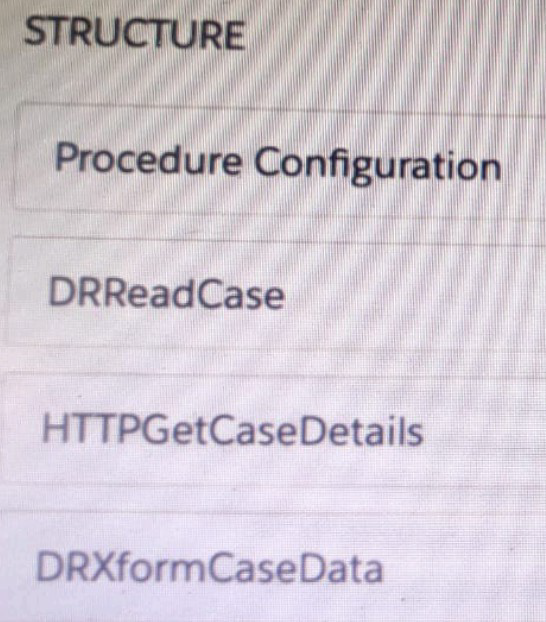
A. %DRReadCase: CaseNumber%
B. ((DRRCase, CaseNumber))
C. MTTOPDetCaseDetail: CaseNumber%
D. ((CaseNumber))
Summary
In an Integration Procedure, data is passed between actions through a data pipeline. To reference an output from a previous action, you use a merge field syntax. The correct syntax follows a specific pattern that identifies the source action and the specific data node you want to access. This allows you to dynamically build values, such as a URL, with data retrieved earlier in the procedure's execution.
Correct Option
A. %DRReadCase:CaseNumber%
This is the correct merge field syntax for referencing data from a previous action within an Integration Procedure. It uses percent signs % to denote the merge field, followed by the name of the previous action (DRReadCase), a colon :, and the name of the specific output node from that action (CaseNumber). This tells the Integration Procedure to insert the value of the CaseNumber from the DRReadCase action's output into the HTTP URL.
Incorrect Option
B. ((DRRCase,CaseNumber))
This syntax is invalid. It uses parentheses and a comma, which are not part of the standard merge field syntax in Integration Procedures. The correct format uses percent signs and a colon as the delimiter.
C. %HTTPGetCaseDetails:CaseNumber%
This is incorrect because it references the HTTPGetCaseDetails action, which is the action that needs the value, not the action that provides it. The DRReadCase action occurs before HTTPGetCaseDetails in the procedure flow, so only DRReadCase's output is available at the time the HTTP Action is configured.
D. ((CaseNumber))
This syntax is incomplete and incorrect. It does not specify which action in the procedure is the source of the CaseNumber data. Without specifying the source action (e.g., DRReadCase), the Integration Procedure cannot resolve where to get the value from.
Reference
Salesforce OmniStudio Developer Guide: Integration Procedure Data Pipelining
Which two of these options can a developer use to retrieve data from a Salesforce object?
(Choose 2 answers)
A. A DataRaptor Load Action
B. A DataRaptor Extract Action
C. A Lookup Input Element
D. A DataRapt or Post Action
Summary
Retrieving data from a Salesforce object involves querying and reading records. In OmniStudio, specific tools are designed for this purpose. The correct options will be components whose primary function is to fetch data from the database and make it available within the OmniScript or Integration Procedure, as opposed to components designed for writing data or capturing user input.
Correct Option
B. A DataRaptor Extract Action
This is a primary tool for data retrieval. A DataRaptor Extract is explicitly designed to read data from one or more Salesforce objects. It can be configured with SOQL-like filters and relationships to return specific sets of data, which can then be used to populate an OmniScript or be processed within an Integration Procedure.
C. A Lookup Input Element
The Lookup element serves a dual purpose. While it provides a user interface to search for a record, it also automatically retrieves and pre-fills data from the selected record into other fields on the OmniScript. This inherently involves querying and reading data from a Salesforce object based on the user's selection.
Incorrect Option
A. A DataRaptor Load Action
A DataRaptor Load Action is used for writing data to the database. Its purpose is to create, update, or upsert records in a Salesforce object. It does not retrieve data for use in the application; it persists data from the application to the database.
D. A DataRaptor Post Action
This is not a standard OmniStudio action type. "DataRaptor Post" is likely a distractor and is not a recognized category. DataRaptors are categorized as Extract, Transform, or Load. There is no "Post" type, and if it refers to anything, it would be synonymous with a Load action, which is for data creation/update, not retrieval.
Reference
Salesforce OmniStudio Developer Guide: DataRaptor Extract
A developer configures a FlexCard with a Data Mapper data source that uses the
params.id as an input. When the developer clicks "View Data" on the FlexCard, valid data
displays. However, when the developer previews the layout, the FlexCard does not display.
What could cause this error? Choose 2 answers
A. The Record Id in the Test Data Source Settings is for the wrong record type
B. There is no Salesforce record for the FlexCard based on the RecordId in the layout's Test Data Source Settings.
C. The Data Node field for the FlexCard is empty.
D. The Attributes haven't been configured to pass the data to the fields.
Explanation:
B. No Salesforce record for the RecordId in Test Data Source Settings
The Test Data Source Settings in a FlexCard layout determine which record is used during preview.
If the RecordId provided doesn’t exist in Salesforce (or points to a deleted/nonexistent record), the FlexCard will fail to display in preview.
This explains why “View Data” works (it uses the Data Mapper directly with params.id), but preview fails (it relies on the layout’s test settings).
C. Data Node field is empty
The Data Node defines the root of the JSON structure that the FlexCard binds to.
If the Data Node field is left empty, the FlexCard has no reference point to map the incoming data to its UI elements.
Result: Even though data is retrieved, nothing is displayed in the FlexCard preview.
❌ Why not A or D?
A. Wrong RecordId type → If the RecordId is of the wrong type, Salesforce would still return data (or an error). The key issue here is no record at all, not wrong type.
D. Attributes not configured → Attributes are used to pass data between parent and child FlexCards or OmniScripts. In this case, the FlexCard is directly bound to the Data Mapper, so missing attributes wouldn’t prevent display.
📚 Reference
Salesforce OmniStudio Docs: FlexCards Data Source Configuration
Key principle: FlexCard preview depends on valid Test Data Source settings and a properly defined Data Node.
👉 Memory tip for the exam:
If “View Data” works but preview fails → check Test Data Source settings and Data Node.
A developer creates an OmniScript to update billing information.After analyzing the different types of customer interactions that occur at the company, the developer determines updating billing information should be included in the majority of customer interactions, which are represented by more than 20 different FlexCards.
What is the most efficient way for the developer to configure the action that invokes the OmniScript?
A. As an OS Action
B. As a Custom Action
C. As an OmniStudio Action
D. As a Lightning Action
Summary
The requirement is to reuse the same OmniScript across more than 20 different FlexCards. The most efficient configuration avoids recreating the same action in every card. An OS Action is a predefined action type specifically designed for this purpose. It allows a developer to create the action configuration once and then reference it by name in any number of FlexCards, ensuring consistency and simplifying maintenance.
Correct Option
A. As an OS Action
This is the most efficient method. An OS Action is a reusable action definition stored at the application level. The developer creates the OS Action once, configuring it to launch the specific OmniScript. This single OS Action can then be selected and used across all 20+ FlexCards. Any future updates to the action (e.g., changing a parameter) only need to be made in the single OS Action definition, and it will automatically propagate to all FlexCards using it.
Incorrect Option
B. As a Custom Action
A Custom Action is used to invoke an external, non-OmniStudio web service or Apex method. It is not the correct action type for launching another OmniScript. Using it for this purpose would be incorrect and require complex, custom configuration.
C. As an OmniStudio Action
This is the general category or family of actions (which includes OS Action, Data Action, etc.), not a specific, configurable type. When adding an action in a FlexCard, you select a specific type like "OS Action," not the generic "OmniStudio Action." This term is too vague for the specific configuration needed.
D. As a Lightning Action
A Lightning Action refers to a standard or quick action on a Salesforce object record page. It is not a type of action that can be configured within an OmniStudio FlexCard. FlexCards use the OmniStudio-specific action types, such as OS Action, to trigger other OmniStudio components.
Reference
Salesforce OmniStudio Developer Guide: OS Action
Users receive an APEC CPU limit Exceeded error when running an OmniScript in a Salesfoce Community. The OmniScript includes an Integration Procedure that contains two DataRaptors.
Which two Location should the developer check to troubleshoot the issue?
(Choose 2 answers)
A. Script configuration
B. Community logs
C. DataRaptor configuration
D. Action Debugger
Summary
An Apex CPU limit error indicates that the OmniScript's server-side logic is consuming excessive processing time. Since the error is tied to an Integration Procedure containing DataRaptors, the investigation must focus on the components executing server-side Apex code. The configuration of the DataRaptors and the detailed execution logs of the actions are the primary sources to identify inefficient queries or complex transformations causing the performance bottleneck.
Correct Option
C. DataRaptor configuration
The DataRaptor configuration is a primary suspect. Inefficient DataRaptor Extracts, especially those without filters or that query large data sets, can consume significant CPU time. Similarly, complex DataRaptor Transforms with numerous formulas or loops can be computationally expensive. Reviewing the DataRaptor logic for optimizations, such as adding LIMIT clauses or simplifying transformations, is a critical troubleshooting step.
D. Action Debugger
The Action Debugger in the OmniScript and Integration Procedure preview tools provides detailed, step-by-step execution logs. It shows the precise execution time and output for each action, including the two DataRaptors. This allows the developer to pinpoint exactly which action is consuming the most CPU time, confirming whether it is a specific DataRaptor or another element in the sequence.
Incorrect Option
A. Script configuration
While general OmniScript settings exist, there is no specific "Script configuration" that directly controls CPU usage or would reveal the root cause of a CPU limit error. The problem is almost always tied to the logic within the actions (like DataRaptors) called by the script, not the high-level script properties themselves.
B. Community logs
Community logs are general system logs that might show the occurrence of the error but lack the granular, component-level detail needed to diagnose it. They will not show which specific DataRaptor or action within the Integration Procedure is causing the high CPU consumption. The OmniStudio-specific Action Debugger is the correct tool for this level of detail.
Reference
Salesforce OmniStudio Developer Guide: Test an Integration Procedure
Refer to the exhibit.
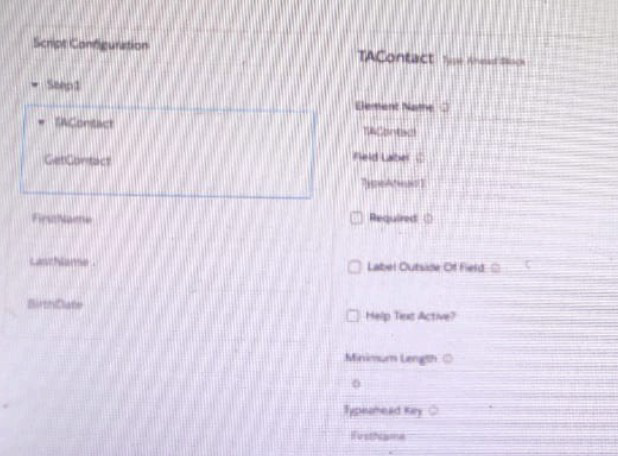
A developer creates an OmniScript display FirstName, LastName, and BirthDate of a contact using a Type Ahead Block. The DataRaptor used in the Type Ahead has been tested and fetches the correct data.
When previewing Omniscript, the developer enters a name in the Type Ahead and makes a selection of a contact from the list. However, the text fields FirstName. LastName, and BirthDate are notgetting populatedwith the data.
What is the reason that the fields fail to display the fetched data?
A. Lookup Mode is not selected in the properties of the Type A Head Block.
B. Use Data JSON is not selected in the properties of the Type Ahead Block.
C. FirstName, LastName, andBirthdateare not placed inside the Type ahead Block.
D. The Typeghead ley is not in the correct format
Summary
A Type Ahead Block is a container element designed to manage a set of related fields for a single record. For child elements like FirstName, LastName, and BirthDate to be automatically populated when a selection is made from the type-ahead dropdown, they must be placed inside the Type Ahead Block in the OmniScript structure. This allows the block to manage the data context and mapping for all its child elements based on the selected record.
Correct Option
C. FirstName, LastName, and Birthdate are not placed inside the Type Ahead Block.
This is the most likely cause. The Type Ahead Block functions as a data context container. When a user selects a record from the dropdown, the block receives the full data object for that record. It then automatically populates the values of all input elements (like Text and Date elements) that are placed inside it, provided their "Data JSON Path" matches a field in the returned data. If these elements are outside the block, they are not part of this automatic data mapping and will remain empty.
Incorrect Option
A. Lookup Mode is not selected in the properties of the Type Ahead Block.
"Lookup Mode" is a property of the standalone Lookup element, not the Type Ahead Block. The Type Ahead Block does not have a "Lookup Mode" property. This option confuses two different OmniScript elements.
B. Use Data JSON is not selected in the properties of the Type Ahead Block.
The "Use Data JSON" property is typically found on elements like the Select element to define a remote data source. The Type Ahead Block's configuration is centered around its "Data Source" (e.g., a DataRaptor) and the placement of child elements, not a "Use Data JSON" checkbox.
D. The Type Ahead key is not in the correct format.
The "Type Ahead Key" property is used to specify which field from the fetched data should be displayed in the main input field and used for filtering. If this were incorrectly formatted, the dropdown list itself would not populate with options correctly. The scenario states that the developer can "make a selection of a contact from the list," indicating the key is working and the list is populating. The issue is with populating other fields after the selection, which is a separate mechanism.
Reference
Salesforce OmniStudio Developer Guide: Type Ahead Block Element
A developer creates a new FlexCardto display customer data and actions, such as updating billing information and changing the contact for the customer account. The FlexCard contains 10 fields and 5 actions.
During testing, several fields display with the correct data, but one of the fieldsshows only the label.
What could cause this?
A. The fields have exceeded the maximum number allowed on the card.
B. The field is null 0 the Salesforce record.
C. {recordld} us misspelled in the Data Source Input Map.
D. There are no test parameters configured.
Summary
When a FlexCard field displays its label but no value, it indicates a data mapping issue where the target field exists in the card's layout but the data source is not providing a value for it. The most common cause is that the specific field is empty (null) on the Salesforce record retrieved by the DataRaptor. The FlexCard renders the label as defined in the layout, but has no data to display for the value.
Correct Option
B. The field is null on the Salesforce record.
This is the most direct and likely cause. The FlexCard's DataRaptor successfully retrieved the record, which is why other fields display data. However, for this specific field, the value on the Salesforce record is blank (null). The FlexCard correctly renders the label defined in the designer but has no data to populate the value, resulting in an empty space next to the label.
Incorrect Option
A. The fields have exceeded the maximum number allowed on the card.
There is no strict, low limit (like 15 total elements) on the number of fields and actions a FlexCard can contain. If a maximum were exceeded, it would more likely cause broader rendering issues or errors, not a single field failing to display its data while others work correctly.
C. {recordId} is misspelled in the Data Source Input Map.
A misspelled {recordId} in the Data Source Input Map would prevent the DataRaptor from executing correctly for the specific record context. This would cause a complete data retrieval failure, meaning none of the fields would display data, not just a single field.
D. There are no test parameters configured.
Test parameters are used for previewing the FlexCard in the builder. If test parameters were missing, the card would fail to load data during preview. The scenario implies testing is occurring, and since most fields display correctly, the DataRaptor is successfully running and receiving a valid record ID, ruling this out as the cause.
Reference
Salesforce OmniStudio Developer Guide: Troubleshoot FlexCards
A developer needs to configure a DataRaptor to retrieve data from a single object. The structure of the output data does not need to be changed.
Following best practices, which type of DataRaptor should the developer use?
A. DataRaptor Transform
B. DataRaptor Extract
C. DataRaptor Load
D. DataRaptor Turbo Extract
Summary
The scenario requires retrieving data from a single object without transforming its structure. While a standard DataRaptor Extract can perform this task, the key factor is following best practices for performance. Turbo Extract is a specialized, high-performance version of the Extract type, designed specifically for fast, straightforward data retrieval from a single object, making it the optimal choice when no complex data shaping is required.
Correct Option
D. DataRaptor Turbo Extract
A Turbo Extract is the best practice for this scenario because it is optimized for performance. It directly translates its configuration into a single, efficient SOQL query, minimizing processing overhead. Since the requirement is simple retrieval from one object with no need to change the output structure, Turbo Extract provides the fastest and most efficient method, adhering to the principle of using the least resource-intensive tool for the job.
Incorrect Option
A. DataRaptor Transform
A Transform is used when you need to significantly restructure, combine, or calculate values from the source data. Its primary purpose is to change the format of the JSON output, not just to retrieve data. Using a Transform for simple retrieval is inefficient and goes against best practices, as it introduces unnecessary complexity and processing.
B. DataRaptor Extract
A standard Extract can retrieve data and is more flexible than a Turbo Extract, allowing for multi-object relationships and some data manipulation. However, for the specific case of retrieving data from a single object with no structural changes, a Turbo Extract is the superior best-practice choice due to its performance advantages.
C. DataRaptor Load
A Load DataRaptor is used for a completely different purpose: to create, update, or upsert records in the database. It is not used for retrieving data at all. Using it in this context would be incorrect and would not fulfill the requirement.
Reference
Salesforce OmniStudio Developer Guide: Turbo Extract Overview
A developer needs to configure a calculation procedure to calculate the sum of the entire base price.
What is the most efficient way for the developer to meet this requirement?
A. Create a Post process or apex class to calculate the sum.
B. Add an Aggregation Step as SUM (BasePrice)
C. Add A Calculation Step as SUM (BasePrice).
D. Create a Preprocess or class to calculate the sum
Summary
The requirement is to calculate the sum of a specific field (BasePrice) across all records in a dataset. This is a classic aggregation operation. The most efficient method is to perform this calculation at the database level or within the data processing engine, which is designed for such operations, rather than moving the data into a more complex, custom-coded environment like Apex.
Correct Option
B. Add an Aggregation Step as SUM (BasePrice)
This is the most efficient solution. An Aggregation Step within a DataRaptor Transform is specifically designed for this purpose. It performs the SUM operation directly on the dataset as it is being processed by the OmniStudio engine. This is a declarative and optimized approach that avoids the overhead of Apex and efficiently calculates the total without requiring custom code.
Incorrect Option
A. Create a Postprocessor Apex class to calculate the sum.
This is inefficient and against best practices. A Postprocessor Apex class would require the entire dataset to be passed into Apex, where a loop would then be written to calculate the sum. This is a programmatic and resource-intensive approach for a simple aggregation that the platform's declarative tools can handle more efficiently.
C. Add a Calculation Step as SUM (BasePrice).
A Calculation Step in a DataRaptor Transform is used to create a new calculated field for each individual record (e.g., LineTotal = Quantity * UnitPrice). It cannot perform an aggregation (like SUM, COUNT) across all records in the dataset. It operates on a row-by-row basis, not on the entire dataset.
D. Create a Preprocessor class to calculate the sum.
A Preprocessor Apex class runs before the DataRaptor and is typically used to modify input data. It does not have access to the full dataset of records that the DataRaptor will process, so it cannot calculate a sum of a field across all records. This is the wrong tool for the job.
Reference
Salesforce OmniStudio Developer Guide: Aggregation Step in DataRaptor Transform
| Page 3 out of 18 Pages |
| 123456 |
| OmniStudio-Developer Practice Test Home |
Our new timed 2026 OmniStudio-Developer practice test mirrors the exact format, number of questions, and time limit of the official exam.
The #1 challenge isn't just knowing the material; it's managing the clock. Our new simulation builds your speed and stamina.
You've studied the concepts. You've learned the material. But are you truly prepared for the pressure of the real Salesforce Certified OmniStudio Developer - Plat-Dev-210 exam?
We've launched a brand-new, timed OmniStudio-Developer practice exam that perfectly mirrors the official exam:
✅ Same Number of Questions
✅ Same Time Limit
✅ Same Exam Feel
✅ Unique Exam Every Time
This isn't just another OmniStudio-Developer practice questions bank. It's your ultimate preparation engine.
Enroll now and gain the unbeatable advantage of: