
Total 173 Questions
Last Updated On : 26-Oct-2026

A developer isbuilding an OmniScript and needs to retrieve data from Salesforce and from an on-premises billing database.
Which two OmniScript elements could retrieve this data?
(Choose 2 answers)
A. Navigate Action
B. DataRaptor Extract Action
C. HTTP Action
D. Response Action
Summary
The requirement involves retrieving data from two different sources: Salesforce (internal) and an on-premises database (external). An OmniScript must use different elements to interact with these distinct systems. One element is designed for internal Salesforce data queries, while another is designed for communicating with external systems via web services.
Correct Option
B. DataRaptor Extract Action
This element is specifically designed to retrieve data from Salesforce objects. A DataRaptor Extract can be configured with SOQL queries and relationships to efficiently fetch data from within the Salesforce database, making it the correct tool for the internal data retrieval requirement.
C. HTTP Action
This element is used to call external REST APIs or web services. To access an on-premises billing database, you would typically create a middleware API endpoint that connects to the database. The HTTP Action in the OmniScript would then call this external endpoint to retrieve the required billing data, making it the correct tool for the external data retrieval requirement.
Incorrect Option
A. Navigate Action
The Navigate Action is used to control the user's flow within the OmniScript, such as moving to the next step or a different step set. It does not retrieve data from any source, whether internal or external.
D. Response Action
The Response Action is used at the end of an Integration Procedure to structure and send data back to the calling OmniScript. It is an output element, not a data retrieval element. It does not fetch data from Salesforce or external systems itself.
Reference
Salesforce OmniStudio Developer Guide: DataRaptor Extract
Which two fields in an Integration Procedure can use a function like CONCAT or DATEDIFF?
(Choose 2 answers)
A. In Procedure Configuration, ina TrackingCustom Data value field.
B. In a Remote Action, in a Remote Options value field.
C. In a Remote Action, in an Additional Output value field.
D. In a Response Action, in an Additional input value field.
What two advantages does a DataRaptor Turbo Extract have over a standard DataRaptor Extract?
(Choose 2 answers)
A. It populates data in PDF and DocuSign format
B. It is easier to configure
C. It has better performance at runtime
D. It supports complex field mappings
Summary
A DataRaptor Turbo Extract is a specialized, high-performance variant of the standard DataRaptor Extract. It is optimized for specific use cases, primarily speed and simplicity. Its advantages are most apparent in scenarios requiring fast data retrieval from a single Salesforce object without complex data transformations. The key benefits are its streamlined configuration process and superior execution performance.
Correct Option
B. It is easier to configure
Turbo Extract has a simpler, more streamlined user interface compared to a standard Extract. It is designed for straightforward data retrieval from a single object, eliminating many of the complex tabs and options found in a standard Extract (like multiple Extract steps or complex filtering logic). This makes it quicker and easier for developers to set up for basic queries.
C. It has better performance at runtime
This is the primary advantage. A Turbo Extract is translated directly into a single, efficient SOQL query. It has less processing overhead than a standard DataRaptor Extract, which may involve more complex engine processing for multi-object relationships and transformations. This results in faster execution times and reduced consumption of Salesforce governor limits.
Incorrect Option
A. It populates data in PDF and DocuSign format
This is incorrect. The ability to populate PDF or DocuSign templates is a function of the OmniScript and its corresponding PDF Action or DocuSign Action, not the type of DataRaptor used. Both standard and Turbo Extracts can provide data to these features; neither has a specific advantage in this area.
D. It supports complex field mappings
This is actually an advantage of a standard DataRaptor Extract, not a Turbo Extract. Turbo Extracts are designed for simplicity and performance, which means they sacrifice some flexibility. They do not support complex features like multi-object relationships, custom WHERE clauses with formulas, or the same level of complex data shaping that a standard Extract provides.
Reference
Salesforce OmniStudio Developer Guide: Turbo Extract OverviewExplanation:
A DataRaptor Turbo Extract is a simplified version of a DataRaptor Extract that can retrieve data from a single object without changing the structure of the output data. It is easier to configure because it does not require defining extraction steps or JSON paths. It also has better performance at runtime because it uses a native query engine instead of a custom one
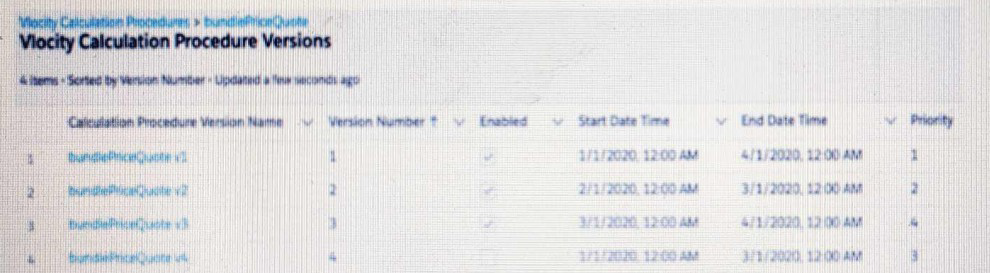
Which calculation procedure version in the list would execute on 2/15/2020at 12:00 PM?
A. Version Number 1
B. Version Number 4
C. Version Number 2
D. Version Number 3
Summary
Calculation Procedures use a priority-based execution system where multiple versions can be active simultaneously. When a procedure is triggered, all enabled versions whose date ranges encompass the current date/time are executed. The results are then processed based on their assigned Priority number, with the result from the version with the highest priority number (not the lowest) being the one that is ultimately returned.
Correct Option
C. Version Number 2
On 2/15/2020, we must first identify which versions are active. Version 1 (1/1 - 4/1), Version 2 (2/1 - 3/1), and Version 3 (3/1 - 4/1) are all active on this date. Version 4 is not active as its start and end date are the same (3/1). Among the active versions (1, 2, 3), Version 2 has the highest Priority (2), followed by Version 1 (1), and then Version 3 (which is active but has a lower priority of 4 is irrelevant since Version 2 is active and has priority 2). Therefore, the result from Version Number 2 would be returned.
Incorrect Option
A. Version Number 1
While Version 1 is active on 2/15/2020, its Priority (1) is lower than the Priority of Version 2 (2). In Calculation Procedures, the version with the highest priority number wins. Therefore, Version 1 would not be the one whose result is returned.
B. Version Number 4
Version 4 is not active on 2/15/2020. Its start and end date are both 3/1/2020, meaning it is only active for a single day. Since the date in question is 2/15, this version would not execute at all.
D. Version Number 3
Version 3 becomes active on 3/1/2020. The date in question is 2/15/2020, which is before this version's start date. Therefore, it is not active and will not execute.
Reference
Salesforce OmniStudio Developer Guide: Calculation Procedures and Versions
A developer is creating a FlexCard and needs to display additional information using a Flyout.
Which two types of components can the developer embed in the flyout?
(Choose 2 answer)
A. An OmniScript
B. An Integration Procedure
C. A DataRaptor
D. A Child FlexCard
Summary
A Flyout is a UI component in OmniStudio that appears dynamically (e.g., on hover or click) to display additional information without navigating away from the main screen. It acts as a container for other interactive components. The elements that can be embedded within a Flyout are those that provide a user interface or visual representation, allowing for a rich and interactive user experience directly from the FlexCard.
Correct Option
A. An OmniScript
An OmniScript can be embedded within a Flyout. This allows the Flyout to present a multi-step, guided form for tasks like updating information or submitting a request without requiring the user to leave the context of the FlexCard. The OmniScript provides a structured user interface and logic flow.
D. A Child FlexCard
A Child FlexCard can be embedded within a Flyout. This is a common pattern for displaying related records or more detailed information in a structured card format. The Child FlexCard can have its own data source and design, providing a modular way to show additional data.
Incorrect Option
B. An Integration Procedure
An Integration Procedure is a headless, server-side component used for data processing and orchestration. It does not have a visual interface and therefore cannot be displayed or embedded directly within a Flyout. An Integration Procedure can be called by an OmniScript or FlexCard within the Flyout, but it is not the embedded component itself.
C. A DataRaptor
A DataRaptor is a data manipulation tool used for extracting, transforming, or loading data. Like an Integration Procedure, it is a headless component with no user interface. It cannot be embedded in a Flyout. A DataRaptor is used as a data source for a FlexCard or OmniScript that is embedded in the Flyout.
Reference
Salesforce OmniStudio Developer Guide: Configure a Flyout
A developer is creating anOmniScript that Provisions trial orgs to their customers. The following text block in the OmniScript uses a merge code to display the ID for the new trial org:
Welcome to Salesforce
Your ID is %Details: Customer10:ID%
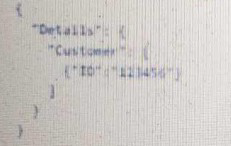
During testing, the developer noticesthat the ID does not display. The data JSON is structured as shown below.
How should the developer correct the merge code in order for the ID to display?
A. To %%Details:Customer|0:ID%%
B. To %%Details:Customer|n:ID%
C. To %%Details:Customer|1:ID%
D. To$Details:Customer|0:ID$
Summary
The issue is that the Customer node in the JSON structure is an array (indicated by the square brackets []), not a single object. To access a field from a specific record within an array, you must specify the index of that record using the pipe and index syntax |index. Array indices start at 0, so the first element in the array is at index 0.
Correct Option
A. To %%Details:Customer|0:ID%%
This is the correct merge field syntax. Details:Customer|0:ID breaks down as follows:
Details: The parent node.
Customer: The array node.
|0: The index specifier, targeting the first element in the Customer array.
ID: The target field within that specific array element.
Using %%...%% is the correct syntax for merge fields in an OmniScript Text Block.
Incorrect Option
B. To %%Details:Customer|n:ID%
Using |n is not valid syntax. The index must be a specific numerical value (e.g., 0, 1, 2) to pinpoint a single element within the array. The placeholder n will not resolve and will cause the merge field to fail.
C. To %%Details:Customer|1:ID%
While the syntax |1 is valid for accessing the second element in an array (since indices start at 0), the provided JSON structure shows only one object in the Customer array. Therefore, index 1 is out of bounds, and no data would be found.
D. To$Details:Customer|0:ID$
This uses the wrong delimiters for a merge field in an OmniScript Text Block. The correct delimiters are percent signs %%...%%, not dollar signs $...$. Using incorrect delimiters means the text will be treated as plain text, and the value will not be merged.
Reference
Salesforce OmniStudio Developer Guide: Merge Fields
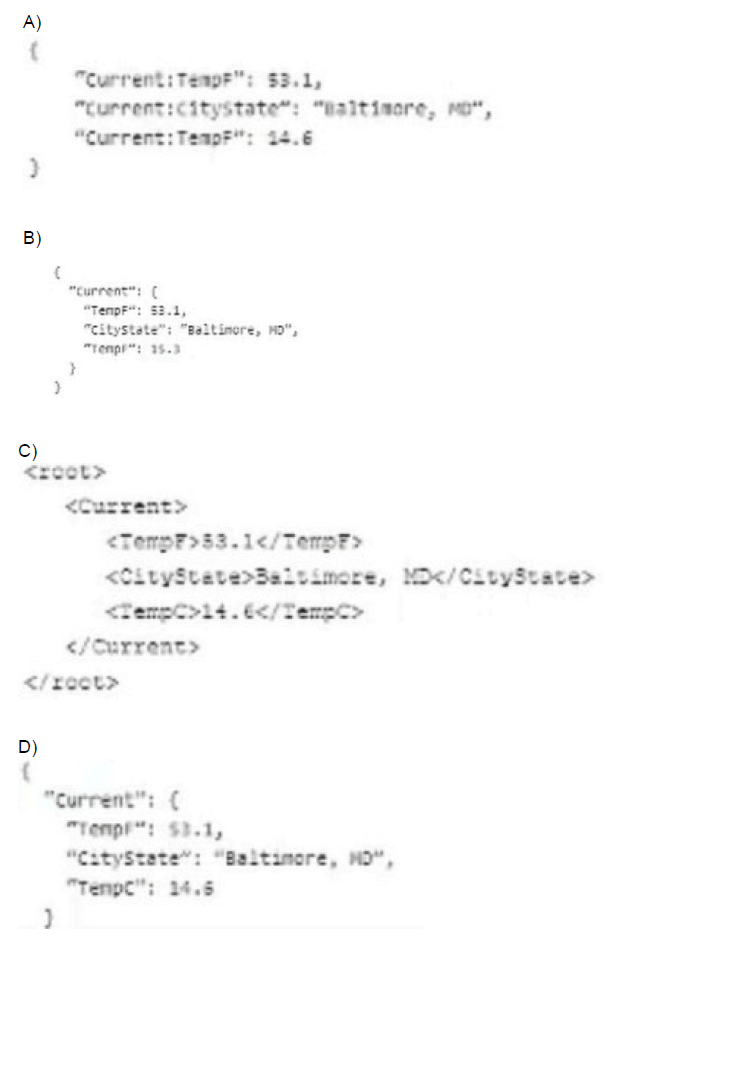
A developer needs to build a DataRaptor Transform to send current weather to both an OmniScript Card Layout. Which of these samples would be valid for the Expected Output JSON?
A. Option A
B. Option B
C. Option C
D. Option D
Summary
The DataRaptor Transform requires a valid JSON structure for its "Expected Output JSON." This defines the schema that the Transform will build. A valid JSON object must have key-value pairs enclosed in curly braces {}, with keys in double quotes and values that can be strings, numbers, objects, or arrays. The structure must also be free of duplicate keys at the same level, as this makes the JSON invalid and unparsable.
Correct Option
D. Option D
This is the only valid JSON structure. It is a properly formatted JSON object {} with a single top-level key, "Current", whose value is another valid JSON object. This nested object contains unique keys ("TempF", "CityState", "TempC") with appropriate string and number values. This structure is both syntactically correct and semantically sound for representing structured weather data.
Incorrect Option
A. Option A
This is invalid JSON for two reasons. First, it uses a double colon :: as a separator (e.g., "Current::TempF"), which is not standard JSON syntax. Second, and most critically, it contains a duplicate key "Current::TempF" at the same level, which is not allowed in a JSON object and would cause a parsing error.
B. Option B
This option is invalid because it contains a duplicate key "TempF" within the same "Current" object. A JSON object cannot have two identical keys. This would fail during parsing and is not a valid structure.
C. Option C
This is not JSON; it is an XML structure. It is enclosed in
Reference
Salesforce OmniStudio Developer Guide: DataRaptor Transform
A developer is creating a FlexCard for a new Community page. The FlexCard will display case information along with actions to close the case and update the case, and it will be styled using the Community's theme.
What must the developer do to configure the FlexCard for deployment in acommunity?
A. Set the Deployment property in Card Configuration to "Community"
B. Add the FlexCard's API name to the FlexCard Player component
C. Set the Target property in Publish Options to "CommunityPage"
D. Configure the Component Visibility in the Custom Component
Summary
To display a FlexCard on a Salesforce Community page, it must be embedded within a specific Lightning component that acts as its container and renderer. The FlexCard itself is a headless component; it needs a visual host to be displayed to users. This is done by adding the FlexCard Player component to the Community page and configuring it to point to the specific FlexCard.
Correct Option
B. Add the FlexCard's API name to the FlexCard Player component
This is the correct and necessary step. The "FlexCard Player" is a pre-built Lightning component designed to host and display FlexCards within Lightning pages and Communities. The developer must add this component to the desired Community page and then set its "Card" property to the API name of the FlexCard they created. This creates the link between the visual container and the FlexCard's logic and design.
Incorrect Option
A. Set the Deployment property in Card Configuration to "Community"
There is no standard "Deployment" property within the FlexCard's configuration settings that is set to "Community." The deployment target is managed by how and where the FlexCard is used (e.g., by placing it in the FlexCard Player within a Community), not by an internal property.
C. Set the Target property in Publish Options to "CommunityPage"
The "Publish Options" in an OmniStudio component are used to make the component available in certain Salesforce environments, like the OmniScript in a Lightning App Page. It is not the mechanism for deploying a FlexCard to a Community. The deployment is handled by using the FlexCard Player on the page itself.
D. Configure the Component Visibility in the Custom Component
While Component Visibility settings can control when a component is shown (e.g., based on user profile or record type), this is a secondary step for controlling access. It does not perform the primary task of actually placing and rendering the FlexCard on the Community page. The foundational step is first to add the FlexCard Player component.
Reference
Salesforce OmniStudio Developer Guide: Add a FlexCard to a Community
A developer is configuring a Data Raptor Load to Save contract data. The developer needs to set the record type of the contact using Developer Name.
Which two configuration actions should the developer take to set this up in the Data Raptor Load?
A. Check is Lookup property when mapping the fields.
B. Add Link to Record Type object in the Contact Object with the id field of Record Type object.
C. Select Record Type in the Lookup object list. Development in the lookup Field list, and ID in the Lookup Requested Field list.
D. Select Record Type in the Lookup Object list. ID in the Lookup Field list, and Development in the Lookup requested Field list.
E.
Summary
Setting a Record Type using its DeveloperName in a DataRaptor Load requires a lookup operation. The DataRaptor needs to find the Salesforce RecordType ID associated with the given DeveloperName and then assign that ID to the Contact's RecordTypeId field. This is accomplished by configuring a Lookup in the DataRaptor's mapping, which performs a query to resolve the DeveloperName to its corresponding ID.
Correct Option
A. Check is Lookup property when mapping the fields.
This is the fundamental first step. For any field that requires a value to be resolved from another object (like getting a RecordType ID from a DeveloperName), you must enable the is Lookup checkbox on that field's mapping in the DataRaptor Load. This tells the DataRaptor that the provided value is not the final ID but a key to look up the ID from another object.
C. Select RecordType in the Lookup object list. DeveloperName in the Lookup Field list, and ID in the Lookup Requested Field list.
This configuration defines the lookup relationship:
Lookup Object: RecordType - The object to query.
Lookup Field: DeveloperName - The field on the RecordType object that will be matched against the input value from the OmniScript/Integration Procedure.
Lookup Requested Field: Id - The field from the RecordType object that you want to retrieve and assign to the Contact's RecordTypeId field.
Incorrect Option
B. Add Link to RecordType object in the Contact Object with the id field of RecordType object.
This describes creating a relationship in the DataRaptor's "Object Link" section, which is used for extracting and transforming related data in a DataRaptor Extract or Transform. It is not the mechanism for looking up an ID to use when saving a record in a DataRaptor Load.
D. Select RecordType in the Lookup Object list. ID in the Lookup Field list, and DeveloperName in the Lookup requested Field list.
This configuration is reversed and incorrect. It would try to use an Id value from the input data to look up a DeveloperName from the RecordType object. The requirement is the opposite: you have a DeveloperName and need to find the Id.
Reference
Salesforce OmniStudio Developer Guide: Configure a DataRaptor Load
Refer to the following row-versioned calculation matrix.
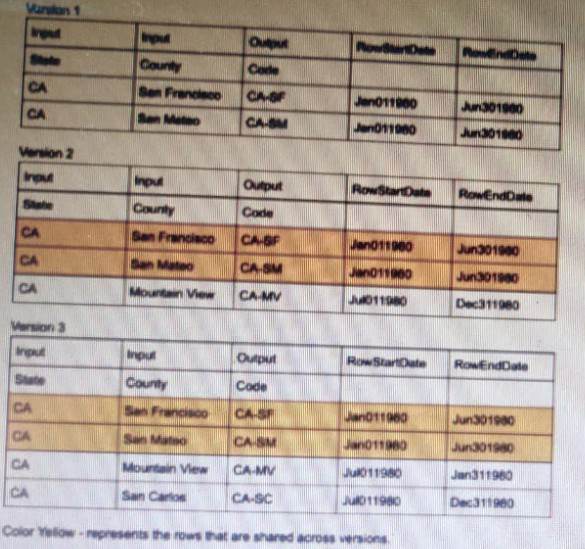
The developer needs to delete the row that contains the Code CA-SF. If the developer deletes that row in Version 3, what is the result?
A. The row is deleted only in Version 3.
B. The row is deleted In Versions 2 and 3 but will remain in Version 1.
C. The row is deleted in Version 3 and Version 1.
D. The row is deleted in all versions
Summary
Calculation Matrices in OmniStudio use a row-versioning system. Each version maintains its own independent set of rows. When a developer creates a new version, it starts as a copy of a previous version, but edits (additions, modifications, or deletions) made to that new version do not affect the rows in previous versions. This isolation allows for managing different rule sets over time without altering historical logic.
Correct Option
A. The row is deleted only in Version 3.
This is the correct behavior of the row-versioning system. A deletion is an edit specific to the version in which it is performed. Since Version 3 is its own distinct entity, deleting the row for code CA-SF will only remove it from Version 3. Versions 1 and 2 remain unchanged and will continue to have their original data, including the CA-SF row.
Incorrect Option
B. The row is deleted In Versions 2 and 3 but will remain in Version 1.
This is incorrect. An edit in a newer version does not cascade backward to previous versions. Version 2 is a separate, established version. A change in Version 3 has no impact on it.
C. The row is deleted in Version 3 and Version 1.
This is incorrect. Versions 1 and 3 have no direct link that would cause a change in one to affect the other. Version 1 is an entirely separate and older version of the matrix.
D. The row is deleted in all versions
This is incorrect. The row-versioning system is designed to prevent this exact scenario. It ensures that changes are contained within the version they are made, preserving the integrity of all other versions for historical reference and different effective date ranges.
Reference
Salesforce OmniStudio Developer Guide: Calculation Matrices and Versions
| Page 4 out of 18 Pages |
| 123456 |
| OmniStudio-Developer Practice Test Home |
Our new timed 2026 OmniStudio-Developer practice test mirrors the exact format, number of questions, and time limit of the official exam.
The #1 challenge isn't just knowing the material; it's managing the clock. Our new simulation builds your speed and stamina.
You've studied the concepts. You've learned the material. But are you truly prepared for the pressure of the real Salesforce Certified OmniStudio Developer - Plat-Dev-210 exam?
We've launched a brand-new, timed OmniStudio-Developer practice exam that perfectly mirrors the official exam:
✅ Same Number of Questions
✅ Same Time Limit
✅ Same Exam Feel
✅ Unique Exam Every Time
This isn't just another OmniStudio-Developer practice questions bank. It's your ultimate preparation engine.
Enroll now and gain the unbeatable advantage of:

Copyright © - All Rights Reserved
SalesforceExams.com is not affiliated with, endorsed by, or sponsored by Salesforce, Inc. All trademarks belong to their respective owners.