
Total 293 Questions
Last Updated On : 24-Aug-2026

Northern Trail Outfitters wants to know the number of Contacts in their account. This information needs to be emailed to their Chief Marketing Officer on a weekly basis. What could be configured to meet this request?
A. Configure the Contact Extract Activity in Automation Studio
B. Query the _Subscriber Data View and Extract it weekly
C. Query the _Contact Data View and transfer it weekly
D. Schedule the Contacts Counts Standard Report
Explanation:
The requirement is a simple, scheduled extraction of the total number of Contacts (a metric) to be sent to the CMO.
D. Schedule the Contacts Counts Standard Report
Reason: Marketing Cloud includes a suite of Standard Reports that provide key metrics, including a report specifically for Contact Counts (sometimes referred to as the All Contacts or Contact Detail Report). These standard reports can be scheduled to run on a weekly basis and automatically delivered via email to specified recipients, perfectly matching the CMO's request without requiring any coding (SQL or AMPScript) or complex automation steps.
❌ Analysis of Incorrect Answers
A. Configure the Contact Extract Activity in Automation Studio
Incorrect: The Contact Extract Activity extracts detailed contact information (like Contact ID, Subscriber Key, Email Address), not a simple count. While it can be automated, extracting millions of records just to get one number is highly inefficient and resource-intensive.
B. Query the _Subscriber Data View and Extract it weekly
Incorrect: The _Subscriber Data View primarily relates to Email Studio Subscribers, which may not align with the total All Contacts count (the true unit of billing). More importantly, this requires writing and maintaining SQL, which is unnecessary when a native report already exists for the required metric.
C. Query the _Contact Data View and transfer it weekly
Incorrect: The _Contact Data View is not a standard, queryable object for contact metrics. Even if a similar data view existed, querying it requires writing and maintaining SQL, which is an overly complex solution compared to using the native report.
📚 References
Salesforce Help Documentation - Marketing Cloud Standard Reports: The documentation confirms that standard reports exist for obtaining key metrics like Contact Counts and that these reports can be scheduled for automated delivery.
Marketing Cloud Consultant Exam Guide - Administration and Reporting: This domain emphasizes using standard, pre-built reporting tools for common operational metrics whenever possible to ensure efficiency and ease of maintenance.
An online retailer would like to utilize Journey Builder interactions for sending post purchase communications to their customers. What Contact Entry mode best fits this scenario?
A. No re-entry
B. Re-entry anytime
C. Re-entry only after existing
D. Re-entry after time
Explanation:
This question assesses the understanding of Journey Builder entry modes in the context of a specific, transactional business use case: post-purchase communications. The correct mode must prevent a poor customer experience while ensuring effective communication.
Scenario Analysis: "Post-purchase communications" implies a series of emails (or other messages) triggered after a customer completes a purchase. Examples include:
- Order confirmation
- Shipping notification
- Delivery confirmation
- Post-delivery satisfaction survey
- Product care tips
- Cross-sell recommendations for related products
Why "Re-entry only after exiting" is the Best Fit:
This entry mode ensures a customer completes one full purchase journey cycle before being eligible to start a new one for a subsequent purchase. This is critical for logical sequencing and avoiding message collisions.
How it Works: A customer who makes a purchase enters the journey (e.g., "2024-05-15 Purchase Journey"). They progress through the series of emails over days or weeks. If they make another purchase while still in that same journey, they will NOT re-enter and start a duplicate, overlapping series of emails. They will only re-enter the journey for the new purchase after they have fully exited the journey from their first purchase.
Consequences of Incorrect Entry Modes:
A. No re-entry
Effect: The customer enters the journey once, for their first-ever purchase, and can never enter again for any future purchase.
Why it's wrong: This would only work for a "Welcome/First Purchase" series. It fails for an ongoing post-purchase program, as repeat customers would never receive order confirmations or shipping updates for their second, third, etc., purchases.
B. Re-entry anytime
Effect: If a customer makes a second purchase while still in the journey from their first purchase, they immediately re-enter and start a second, parallel instance of the journey.
Why it's wrong: This creates a terrible customer experience. The customer would receive duplicate, out-of-sequence, and confusing emails. For example, they might get a shipping notification for Purchase #2 before receiving the order confirmation for Purchase #1, or get two satisfaction surveys on the same day. This mode is suitable for very short, non-sequential journeys (like a weekly newsletter), not for multi-step transactional journeys.
D. Re-entry after time
Effect: The customer can re-enter the journey after a specified waiting period (e.g., 30 days), regardless of whether they have exited the current journey.
Why it's suboptimal: While better than "anytime," it's still flawed for post-purchase. A customer could make two purchases 14 days apart. With a 30-day re-entry setting, they would not re-enter for the second purchase, missing critical communications. This mode is better for promotional cycles (e.g., a "Win-back" journey you don't want to send more than once a month) rather than transactional, event-triggered journeys.
Conclusion: For event-triggered journeys that correspond to a specific logical event (like a purchase), you must ensure the contact finishes the journey for Event A before starting the journey for Event B. "Re-entry only after exiting" enforces this logical queue, making it the industry-standard setting for post-purchase, onboarding, or other multi-step lifecycle journeys.
Key Concept/Reference:
Journey Builder Entry Settings: Critical for managing customer experience and contact frequency.
- No Re-entry: One-time only.
- Re-entry anytime: High risk of duplication; use for very short, non-sequential broadcasts.
- Re-entry only after exiting: The correct choice for transactional and lifecycle journeys to ensure one complete journey cycle per triggering event.
- Re-entry after time: Best for promotional or campaign journeys with a mandated cool-off period.
Northern Trail outfitters needs to reduce the amount of work when managing messages to customers, but cannot add any more personnel due to budget constraints. There has been an increased number of customer purchases on their website, and the team currently sends batch order confirmations. What solution will decrease manual workloads on the team and will improve their customers' experience?
A. A scheduled automation to send emails to customers who made a purchase daily
B. A triggered automation to send emails to customers who have made a purchase
C. A triggered message to send an email as soon as a customer completes a purchase
D. A user-initiated message to send an email to customers who made a purchase daily
Explanation:
Why C is best
NTO’s situation:
Increased web purchases ✅
They currently send batch order confirmations (delay + manual work) ❌
They cannot add more people, so they need automation ✅
They want a better customer experience ✅
A triggered message (triggered send):
Fires immediately when a purchase happens (e.g., via API or event from the website).
Sends a real-time order confirmation → much better customer experience.
Is fully automated → no manual batching or daily prep work.
Is the standard pattern for transactional emails (order confirmations, receipts, password resets, etc.).
So C both reduces manual workload and improves CX the most.
Why the others are weaker
A. Scheduled automation (daily)
Still batch-based → confirmations are delayed until the next run.
Worse customer experience vs. real-time.
Some manual setup/monitoring, and not truly transactional.
B. Triggered automation
You could technically design something where an event drops records into a DE and an automation reacts, but it’s more complex and less direct than a triggered send.
The exam usually expects triggered message for real-time order confirmations.
D. User-initiated message (daily)
Requires a user to initiate or schedule, usually used for marketing/batch sends, not transactional.
Still gives delayed confirmations → not ideal.
Final:
For real-time, low-maintenance order confirmations that delight customers and reduce manual work, choose:
✅ C. A triggered message to send an email as soon as a customer completes a purchase
How do I set up an individual who manages Marketing Cloud operations across channels, mobile, and social? Choose two.
A. Marketing Channel Manager Role
B. Regional or Local Administrator Role
C. Marketing Cloud Administrator Role
D. Email marketing manager role
Explanation:
The individual must manage Marketing Cloud operations across channels, mobile, and social (i.e., Email Studio, MobileConnect, MobilePush, Social Studio / Advertising Studio) and typically across the entire account or multiple Business Units.
A – Marketing Cloud Channel Manager Role
This is the exact standard role Salesforce created for someone who needs to oversee all channels (email, mobile, social advertising) without necessarily having full system-administration privileges.
Key permissions include:
Access to Email Studio, MobileConnect, MobilePush, and Advertising Studio/Social
Manage sends, content, audiences, and journeys across channels
View and run reports across all channels
Often used in multi-BU environments for a person who owns the overall channel strategy and operations
This role is explicitly listed in Salesforce documentation for cross-channel management.
C – Marketing Cloud Administrator Role
This is the highest-level standard role and grants full access to every studio and channel in the account (Email, Mobile, Social, Journey Builder, Automation Studio, Contact Builder, etc.).
It is perfect when the person needs complete operational control and the ability to configure anything across all channels and Business Units.
Why the Other Options Are Incorrect
B – Regional or Local Administrator Role
There is no standard role in Marketing Cloud called “Regional or Local Administrator”.
Salesforce only has “Marketing Cloud Administrator” and sometimes custom roles, but nothing officially named “Regional/Local”. This is a common distractor in exams.
D – Email Marketing Manager Role
This role is limited to Email Studio only.
It does not provide access to MobileConnect, MobilePush, or Social Studio / Advertising Studio.
A person with only this role cannot manage mobile or social operations at all.
References
Marketing Cloud Standard Roles Overview:
Channel Manager Role Description (official):
“Provides access to manage email, mobile, and social channels across the account.”
Marketing Cloud Consultant Certification Study Guide – Security & User Management section:
“Use Marketing Cloud Channel Manager or Marketing Cloud Administrator for cross-channel operational ownership.”
North Trail Outfitters (NTO) wants to automate the sending of shipping notices and a
customer survey.
*Shipping notices will be sent once a day.
*The shipping file will be placed on the FTP sometime after 4:00 p.m.
*The shipping data will be stored in the shipping Notice data extension.
*A field in the data extension will contain the shipping data.
*The survey needs to be sent at 9:00 a.m., exactly 10 days after the customers order ships.
Which workflow would most effectively enable NTO to do this?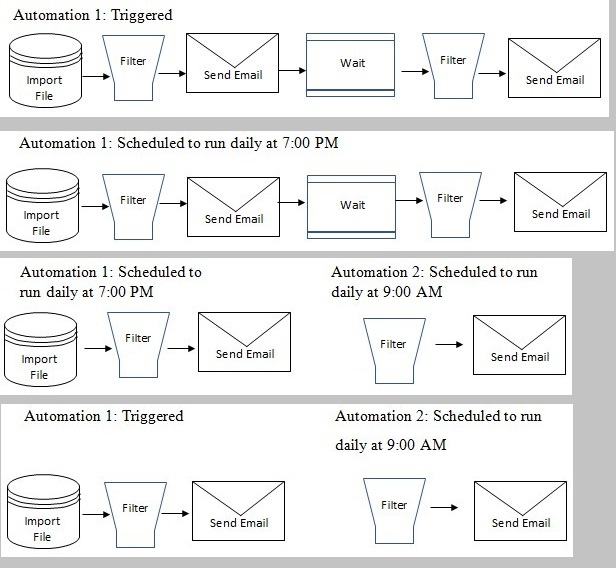
A. Option A
B. Option B
C. Option C
D. Option D
Explanation:
Why Option D works best
Requirements:
Shipping file is placed on FTP once per day, sometime after 4:00 p.m.
Shipping notices should be sent once a day based on that file.
Survey must go exactly 10 days after shipment at 9:00 a.m.
Shipping data is stored in a DE with a shipping date field.
Option D flow
Automation 1 – Triggered (File Drop)
Triggered when the shipping file is placed on the FTP.
Steps: Import File → Filter (Shipping Notice DE) → Send Email (shipping notice)
Ensures the shipping notices go out as soon as the daily file arrives, regardless of the exact time after 4 p.m.
Automation 2 – Scheduled daily at 9:00 a.m.
Steps: Filter (Shipping Notice DE) → Send Email (survey)
Filter selects records where ShipDate = Today - 10 days (and not yet surveyed).
Because it runs every day at 9 a.m., customers receive the survey exactly 10 days after shipping, at 9:00 a.m.
Why the others are wrong
Options A & B use a single automation with a Wait activity.
Automation Studio Wait activities can’t be used to reliably wait 10 days and then hit a specific time (9:00 a.m.), and a 10-day wait inside one automation is not the right pattern here.
Option C has two scheduled automations, but Automation 1 is fixed at 7:00 p.m.
If the shipping file arrives late (after 7:00 p.m.), it won’t be processed that day.
A file-drop–triggered automation is more reliable given the “sometime after 4 p.m.” condition.
So the most effective workflow is:
Automation 1: Triggered on file drop for shipping notices
Automation 2: Scheduled daily at 9:00 a.m. for surveys → Option D.
A consultant needs to send an email to subscribers who have made a purchase. The data
used for the send exists on two data extensions-Subscribers and OrderTable, and the
customer would like to include key information from both tables, such as:
CustomerlD
FirstName
EmailAddress
OrderlD
OrderDate
ShippedDate
Which SQL statement should the consultant use?
A. SELECT T1.CustomerID, T1.FirstName, T1. EmailAddress, T2.OrderlD, T2.0rderDate, T2.ShippedDate FROM ' Subscribers OUTER JOIN OrderTable ON Subscribers.CustomerlD=OrderTable.CustomerlD
B. SELECT * FROM Subscribers WHERE CustomerlD, FirstName, EmailAddress, OrderlD, OrderDate, ShippedDate - JOIN OrderTable On CustomerlD=CustomerlD
C. SELECT CustomerlD, FirstName, EmailAddress, OrderlD, OrderDate, ShippedDate FROM Subscribers INNER JOIN OrderTable ON CustomerlD=CustomerlD
D. SELECT T1.CustomerID, T1.FirstName, T1.EmailAddress, T2.OrderlD, T2.OrderDate, T2.ShippedDate FROM Subscribers T1 INNER JOIN OrderTable T2 ON T1.CustomerID=T2.CustomerID
Explanation:
The consultant needs a sendable query result that contains fields from both Data Extensions:
Subscribers (contains CustomerID, FirstName, EmailAddress)
OrderTable (contains CustomerID, OrderID, OrderDate, ShippedDate)
The query must:
- Be syntactically valid in Marketing Cloud SQL (which is based on T-SQL)
- Return only subscribers who have at least one order (the business requirement is “subscribers who have made a purchase”)
- Explicitly list the required fields (best practice and required for sendable DE)
- Include the EmailAddress field so it can be sendable
Only option D meets all of these requirements:
- Uses proper table aliases (T1 and T2) – required when referencing fields from multiple tables
- Uses INNER JOIN – correct because we only want subscribers who actually have a purchase (INNER JOIN excludes anyone without an order)
- Explicitly selects the needed fields from the correct tables (T1 for subscriber data, T2 for order data)
- Correct ON clause syntax: T1.CustomerID = T2.CustomerID
- Fully valid and will run without error in Automation Studio
Why the Other Options Are Wrong
A
- Uses OUTER JOIN → includes subscribers with no orders (violates the requirement)
- Missing table aliases → ambiguous column references (will cause error)
- Uses single quotes around table names (incorrect syntax)
B
- Completely invalid syntax – WHERE clause followed by JOIN is backwards
- Uses “- JOIN” (not valid SQL)
- SELECT * with mixed fields – not valid
C
- No table aliases → ambiguous column references (CustomerID exists in both tables) → query will fail
- Even if it ran, it would return duplicate column names
References
Marketing Cloud SQL Reference (joins & aliases):
Best Practices for Sendable Queries (official):
“Always use table aliases and explicitly list fields when joining multiple Data Extensions.”
Marketing Cloud Consultant Certification Study Guide – SQL section:
“Use INNER JOIN with aliases when sending to customers who have made a purchase.”
A marketer want to personalize an email with real-time weather information from the Sunny Sky API.
What tool should be used to parse and display the response within the email?
A. Node.JS
B. Apex
C. SSJS
D. GTL
Explanation:
The requirement is to make an external API call to retrieve real-time data (weather information) and then parse and display the JSON or XML response within a Marketing Cloud email.
C. SSJS (Server-Side JavaScript)
Reason: SSJS is the appropriate language for making synchronous or asynchronous Web Service API calls (GET, POST, etc.) from within Marketing Cloud emails, landing pages, or scripts. The SSJS Platform.Function.HTTPGet() (or similar functions from the Core or WSProxy libraries) can retrieve the JSON response from the Sunny Sky API.
Once retrieved, SSJS includes built-in functions (like ParseJSON()) to easily parse the complex JSON structure of the API response and extract the specific weather details needed for personalization.
While AMPScript can also make API calls (HTTPGet), SSJS is generally preferred for handling complex JSON/XML parsing due to its more robust object manipulation capabilities and familiar JavaScript syntax.
❌ Analysis of Incorrect Answers
A. Node.JS
Incorrect: Node.js is a JavaScript runtime environment but is not directly supported as a scripting language within Marketing Cloud emails.
B. Apex
Incorrect: Apex is the proprietary programming language used in Sales Cloud/Service Cloud environments, not for scripting within Marketing Cloud emails.
D. GTL (Guide Template Language)
Incorrect: GTL is a presentation layer language used for defining content blocks and data binding, but it is not designed to execute external API calls to retrieve and process data at send time.
📚 References
Salesforce Help Documentation - Server-Side JavaScript (SSJS) Web Service Functions: Documentation confirms that SSJS, particularly its Core and Platform functions, is designed to perform API calls (e.g., HTTPGet, HTTPPost) and process the responses for dynamic content.
Marketing Cloud Developer Documentation - AMPScript vs. SSJS: Best practices suggest using SSJS when complex JSON parsing or object manipulation of an external API response is required, as it is better suited for this task than AMPScript.
NTO wants to import files at certain standard times, but occasionally a file will be dropped on a Friday if the 30th of the month falls on a weekend. What is the flow?
A. Triggered Import - user initiated send (not scheduled)
Explanation:
Scenario
NTO wants to import files at standard scheduled times.
Occasionally, a file will be dropped on a Friday if the 30th falls on a weekend.
The requirement is to handle both the regular schedule and the occasional Friday drop.
Key Considerations
Triggered Import is used when files arrive at unpredictable times and you want the import to start immediately when the file is dropped on FTP.
Scheduled Import is used when files arrive consistently at known times (e.g., daily at 7 PM).
In this case, the files are usually predictable (standard times), but there is an exception scenario (Friday drop).
The best practice is to use a Triggered Import so that whenever the file is dropped (whether at the standard time or the special Friday drop), the import runs automatically. This avoids missing the file or requiring manual intervention.
✅ Correct Flow
A. Triggered Import – user initiated send (not scheduled)
The Triggered Import ensures the file is ingested whenever it arrives, including the special Friday case.
The user-initiated send ensures the email send is tied to the import completion, not a fixed schedule.
This combination handles both the standard timing and the occasional exception seamlessly.
❌ Why Not Scheduled
If you rely only on a scheduled automation, the Friday drop would not be captured correctly because the file arrives outside the expected schedule. You’d risk missing or delaying the import.
🔗 References
Salesforce Help: Automation Studio Import Activity
Trailhead: Marketing Cloud Data Management
A daily deal website is concerned with their sender reputation and needs consistent visibility into subscribers who report their email as spam. How can they determine which subscribers reported their email as spam so they can flag those records in their customer service database?
A. An automation that queries the Complaint data view.
B. An automation that generates the Unsubscribe Event Extract.
C. An automation that queries the Unsubscribe data view.
D. An automation that generates the Complaint Tracking Extract.
Explanation
The requirement is for consistent visibility into spam reporters so their records can be flagged in a customer service database (implying the data needs to be exported).
D. An automation that generates the Complaint Tracking Extract.
Reason: The Tracking Extract Activity in Automation Studio is a feature designed to extract raw, granular tracking data (including opens, clicks, bounces, and Spam Complaints) into a CSV file. This file is deposited on the SFTP.
The full process involves:
An Automation scheduled to run daily.
A Data Extract Activity configured for the Tracking Extract type, with the Spam Complaints option checked.
A File Transfer Activity to move the extracted file to a publicly accessible SFTP location.
The external system (or another Automation step) then picks up this file to process and flag the corresponding customer records.
This method is the official, scalable way to export raw complaint data out of Marketing Cloud for external systems.
❌ Analysis of Incorrect Answers
A. An automation that queries the _Complaint data view.
Incorrect: The _Complaint Data View contains spam complaint data, and querying it via an SQL Query Activity is a common way to segment subscribers within Marketing Cloud. However, the data view has a data retention limit (typically 6 months). More importantly, getting this data out of Marketing Cloud and onto an SFTP for the customer service database requires an extra step (Data Extract Activity), making the Tracking Extract (Option D) a more direct solution for external systems.
B. An automation that generates the Unsubscribe Event Extract.
Incorrect: The Unsubscribe Event Extract only captures standard unsubscriptions (clicks on the unsubscribe link). While a spam complaint automatically marks a subscriber as unsubscribed, the specific data identifying the event as a spam complaint is in the Complaint Extract, not the general Unsubscribe Extract.
C. An automation that queries the _Unsubscribe data view.
Incorrect: The _Unsubscribe Data View logs all unsubscribes. Similar to option B, while spam complaints result in an unsubscribe, the primary tool for isolating and extracting the complaint event itself is the Complaint-specific tool (the Tracking Extract or _Complaint data view). Furthermore, querying a data view alone does not get the data out to the external customer service database.
📚 References
Salesforce Help Documentation - Tracking Extract Output: Documentation lists the Spam Complaints extract as a specific output type from the Tracking Extract Activity, confirming its role in providing granular, raw complaint data for external export.
Marketing Cloud Consultant Exam Guide - Administration and Data Management: This principle confirms that for exporting large volumes of raw tracking data to external systems (like a data warehouse or customer service database), the Data Extract/Tracking Extract activity is the standard, best-practice solution.
Northern Trail Outfitters wants to send an email to one million contacts in Sales Cloud. The criteria to segment contacts include using 10+ fields to segment. Which process should the consultant utilize for a reliable send method?
A. Query Synchronized Data Extensions using a query activity to a Salesforce Data Extension, then send via Email Studio Send Flow
B. Import Salesforce Report through an import activity to a Salesforce Data Extension, then send to data extension using Email Studio email send
C. Assign the one million contacts from the report to a Salesforce campaign, and use a Single Step journey with Salesforce Campaign as an entry event
D. Send to a Salesforce Report from Marketing Cloud using Email Studio Send Flow
Explanation:
Why Option A Is Correct
Scale requirement: NTO wants to send to 1 million contacts. Sending directly to Salesforce Reports or Campaigns is not reliable at this scale because those entry sources are limited and can time out with very large audiences.
Segmentation requirement: The criteria involve 10+ fields. Complex segmentation is best handled using SQL Query Activities in Automation Studio, which can query across Synchronized Data Extensions (Sales Cloud data synced into Marketing Cloud).
Reliable send method: By querying synchronized data into a Salesforce Data Extension, the marketer creates a send-ready audience. Then, the email is sent via Email Studio Send Flow, which is the most reliable and scalable method for large audiences.
This approach ensures:
Efficient segmentation using SQL.
Reliable delivery to large audiences.
Flexibility to reuse the segmented Data Extension for multiple sends or journeys.
❌ Why Other Options Are Incorrect
B. Import Salesforce Report through an import activity
Salesforce Reports are not scalable for 1M records. They are limited in size and performance.
Importing reports is not recommended for complex segmentation (10+ fields).
C. Assign contacts to a Salesforce Campaign and use as Journey entry
Campaign entry sources are not reliable for very large audiences (like 1M).
Journey Builder is better suited for event-driven or smaller campaign-based sends, not massive batch sends.
D. Send to a Salesforce Report from Marketing Cloud
Direct sends to Salesforce Reports are not supported for large volumes.
Reports are limited in complexity and size, making them unsuitable for this scenario.
🔗 References
Salesforce Help: Synchronized Data Sources
Trailhead: Marketing Cloud Connect
Salesforce Best Practices: Segmentation at Scale with Data Extensions
| Page 6 out of 30 Pages |
| 2345678910 |
| Salesforce-Marketing-Cloud-Engagement-Consultant Practice Test Home |
Our new timed 2026 Salesforce-Marketing-Cloud-Engagement-Consultant practice test mirrors the exact format, number of questions, and time limit of the official exam.
The #1 challenge isn't just knowing the material; it's managing the clock. Our new simulation builds your speed and stamina.
You've studied the concepts. You've learned the material. But are you truly prepared for the pressure of the real Salesforce Certified Marketing Cloud Engagement Consultant - MCE-Con-201 exam?
We've launched a brand-new, timed Salesforce-Marketing-Cloud-Engagement-Consultant practice exam that perfectly mirrors the official exam:
✅ Same Number of Questions
✅ Same Time Limit
✅ Same Exam Feel
✅ Unique Exam Every Time
This isn't just another Salesforce-Marketing-Cloud-Engagement-Consultant practice questions bank. It's your ultimate preparation engine.
Enroll now and gain the unbeatable advantage of:

Copyright © - All Rights Reserved