
Total 196 Questions
Last Updated On : 7-Sep-2026

Certification Aid wants to automate the import of zipped files into a Data Extension. The zip files are placed on the Marketing Cloud Enhanced FTP server every night. Which activity is needed before those files can be imported?
A. File Import activity
B. Data Extract activity
C. Data Extension Import activity
D. File Transfer activity
Summary:
This question focuses on the Automation Studio workflow for importing compressed data files. While the final goal is to populate a Data Extension, the files first need to be moved from the secure "Enhanced FTP" server into the internal, processing area of Marketing Cloud. A specific activity is designed to handle this initial file retrieval step before a standard import can occur.
Correct Option:
D. File Transfer activity:
This is the correct first step. The File Transfer activity is specifically designed to move files between the Marketing Cloud Enhanced FTP server and the internal, processing file locations within the application. Since the zipped files are placed on the FTP, this activity is necessary to "pick them up" and bring them into the automation workflow before they can be unzipped and imported.
Incorrect Option:
A. File Import activity:
This activity is used to import data from a file that is already inside the Marketing Cloud file structure (e.g., in the Import folder). It cannot directly access or retrieve files from the Enhanced FTP server, which is a separate, secure environment.
B. Data Extract activity:
This activity is used to export data out of Marketing Cloud into a file on the FTP server. Its function is the opposite of what is required here, which is an import process.
C. Data Extension Import activity:
This activity, also known as an Import Data Activity, is the correct step after the file has been retrieved. It is used to map the data from a file (which has been transferred via the File Transfer activity) into a target Data Extension. However, it cannot initiate the transfer from the FTP server itself.
Reference:
Salesforce Official Documentation: File Transfer Activity
A developer is managing the data model programmatically and needs to access Attribute Group schema via the API. Which API should the developer use?
A. Bulk
B. SOAP
C. XML
D. REST
Summary:
This question concerns the programmatic management of the Data Model, specifically Attribute Groups, which are part of Marketing Cloud's core configuration. Not all APIs expose the same functionalities. The correct API is the one that provides comprehensive object models and methods for interacting with administrative and schema-level components, which is distinct from APIs focused solely on data manipulation or high-volume operations.
Correct Option:
B. SOAP:
The SOAP API is the correct choice for accessing and managing the Attribute Group schema programmatically. It provides a robust, WSDL-defined object model that includes objects and methods for core configuration tasks, such as retrieving, creating, updating, or deleting the schema of Data Extensions and related Attribute Groups. This makes it the primary API for data model management.
Incorrect Option:
A. Bulk:
The Bulk API is designed for high-volume, asynchronous data operations on records (rows) within existing Data Extensions. It is not used for managing the schema or configuration of the data model itself, such as Attribute Groups.
C. XML:
XML is a data format or markup language, not a distinct API protocol. Both SOAP and some REST endpoints can use XML for their request and response payloads. It is not an API choice in this context.
D. REST:
While the REST API is excellent for many tasks (like data ingestion via Data Events), its coverage for core administrative and schema management objects is not as comprehensive as the SOAP API. Key objects for managing the data model schema, like DataExtension and AttributeGroup, are primarily available through the SOAP API.
Reference:
Salesforce Official Documentation: SOAP API > DataExtension Object
Which AMPscript function group could most negatively Impact send processing?
A. String functions
B. Data extension functions
C. Date Time
D. Math functions
Summary:
This question assesses the performance impact of different AMPscript function groups during the email send process. Send processing happens in real-time for each subscriber, so any function that requires an external resource call introduces latency. Functions that interact with the database are the most resource-intensive, as they force the system to query a Data Extension for every single email being rendered and sent, creating a potential bottleneck.
Correct Option:
B. Data extension functions:
This group, which includes functions like Lookup, LookupRows, and LookupOrderedRows, can most negatively impact send processing. Each call to these functions requires a real-time query to the database. In a large send, millions of individual queries can be generated, significantly slowing down processing times, increasing database load, and potentially causing send throttling or failures.
Incorrect Option:
A. String functions:
Functions like Concat or Substring perform operations in memory on existing string variables. They are computationally inexpensive and have a negligible impact on send processing performance compared to external resource calls.
C. Date Time functions:
Functions like Now or DateAdd perform simple calculations on date values. These are low-cost, in-memory operations that do not require external calls and therefore have minimal performance impact on send processing.
D. Math functions:
Functions like Multiply or Subtract perform basic arithmetic. Similar to string functions, these are computationally trivial operations that are executed quickly in memory and do not pose a performance risk to the send process.
Reference:
Salesforce Official Documentation: AMPscript Performance Considerations
A developer wants to aggregate monthly energy usage data over a four month period for each subscriber within an email. The monthly usage values are stored in variables for each month in the following way:
How should the developer use AMPscript to generate the total?
A. SET @total - (@jan - 3fet - @mar @apr>
B. SET @total = AZD((@jan @feb) @mar) @apr)
C. SET @total - ADD(@jan,ADD(@feb,ADD(@mar,@apr)))
D. SET @total = (ADD(@jan,@feb), ADD(@mar, @apr))
Summary:
This question tests the correct syntax for nested mathematical operations in AMPscript. The goal is to add four numerical variables together. AMPscript does not have a built-in function to sum a list of values in a single call. Instead, the ADD function can only accept two parameters. Therefore, to add more than two numbers, you must nest the ADD functions, breaking the operation down into a series of pairwise additions.
Correct Option:
C. SET @total = ADD(@jan,ADD(@feb,ADD(@mar,@apr))):
This is the correct syntax. It works by first adding the two innermost variables, @mar and @apr. The result of that operation is then used as the second parameter in another ADD function with @feb. Finally, that result is added to @jan, giving the correct total of all four variables.
Incorrect Option:
A. SET @total - (@jan - 3fet - @mar @apr>:
This is completely invalid AMPscript syntax. It uses incorrect operators (- for assignment and subtraction), an undefined variable (3fet), and invalid characters (>). AMPscript does not use standard arithmetic operators like + or - for calculations.
B. SET @total = AZD((@jan @feb) @mar) @apr):
This is incorrect for two primary reasons. First, the function is misspelled as AZD instead of ADD. Second, the syntax (@jan @feb) is invalid. The ADD function requires parameters to be separated by commas, not spaces or parentheses used in this manner.
D. SET @total = (ADD(@jan,@feb), ADD(@mar, @apr)):
This is invalid syntax. It attempts to assign two separate ADD function results (which would be two separate values) to a single variable @total. AMPscript does not support this tuple-like assignment or aggregation. The expression does not specify how the two results should be combined into one total.
Reference:
Salesforce Official Documentation: ADD Function
Certification Aid wants to create a file drop automation with a filename pattern. An import file is placed daily on the Marketing Cloud Enhanced FTP server, and the file name always starts with the current month and day (e.g. OCT26). How should the filename pattern be defined?
(Choose 2).
A. %%Month%%%%Day%%
B. %%MMDD%%
C. Ends With operator
D. Begins With operator
Summary:
This question focuses on configuring the File Transfer activity in an Automation Studio to reliably pick up a file based on a dynamic naming pattern. The file name starts with the current month and day (e.g., OCT26_Data.csv). The solution requires using a pattern that represents the current date and an operator that matches the beginning of the filename, as the variable part is at the start.
Correct Option:
A. %%Month%%%%Day%%:
This is a correct pattern. The %%Month%% system variable will be replaced with the current month's three-letter abbreviation (e.g., OCT), and %%Day%% will be replaced with the current day of the month (e.g., 26). When concatenated, they form the OCT26 pattern that appears at the start of the filename.
D. Begins With operator:
This is the correct operator. Since the known, identifying part of the filename (the date) is at the very beginning, the "Begins With" operator ensures the File Transfer activity will look for files whose names start with the pattern OCT26, regardless of what characters follow.
Incorrect Option:
B. %%MMDD%%:
This is an incorrect pattern. The %%MM%% system variable returns the two-digit numerical month (e.g., 10 for October), not the three-letter abbreviation. The %%DD%% variable returns the two-digit day (e.g., 26). This would result in a pattern like 1026, which does not match the given example filename that starts with OCT26.
C. Ends With operator:
This is the incorrect operator. The filename pattern is defined by its beginning, not its end. Using "Ends With" would be appropriate if the dynamic part, like a timestamp or unique identifier, was at the end of the filename (e.g., Data_OCT26.csv).
Reference:
Salesforce Official Documentation: File Transfer Activity
A developer wants to include a comment within an AMPscript code block for the benefit of other developers who will be reviewing the code. Which syntax should the developer use?
A. < !- This is a comment
B. // This is acomment
C. -- This is a comment
D. /" This is a comment */
Summary:
This question tests knowledge of AMPscript commenting syntax, which is essential for making code readable and maintainable. Comments are non-executable lines intended for developer notes and are ignored by the processing engine. AMPscript, unlike some other languages, has a specific syntax for single-line comments that must be used within its code blocks.
Correct Option:
B. // This is a comment:
This is the correct and only valid syntax for a single-line comment in AMPscript. The double forward slash (//) instructs the AMPscript parser to ignore everything that follows on that line. This is the standard method for adding notes for other developers within an AMPscript block.
Incorrect Option:
A. < !- This is a comment:
This is incorrect. This syntax is reminiscent of an HTML comment (), which is used in HTML markup. It is not recognized as a comment within an AMPscript code block and would cause a syntax error.
C. -- This is a comment:
This is incorrect. The double hyphen (--) is the syntax for a single-line comment in SQL, not in AMPscript. Using this within AMPscript would result in a processing error.
*D. /" This is a comment */:*
This is incorrect. This is a malformed version of a multi-line comment syntax used in languages like C, Java, or JavaScript (which is /* */). The incorrect characters (/") and the overall structure are not valid in AMPscript and would cause a syntax error.
Reference:
Salesforce Official Documentation: Commenting Your AMPscript Code
How can SSJS variables be referenced for content personalization?
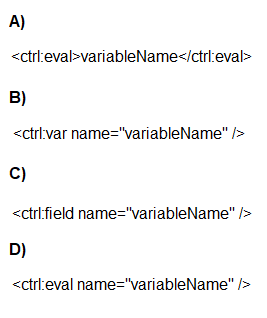
A. Option A
B. Option B
C. Option C
D. Option D
Summary:
This question concerns the correct syntax for outputting the value of a Server-Side JavaScript (SSJS) variable into the HTML of an email or CloudPage. While AMPscript variables can be output directly with percentage signs %%, SSJS requires a specific Guide Template Control Tag to render its variables. The syntax must precisely follow the rules for these custom XML tags.
Correct Option:
B. Option B:
Incorrect Option:
A. Option A:
C. Option C:
D. Option D:
Reference:
Salesforce Official Documentation: Guide Template Control Tags - ctrl:var
A company needs to retrieve a large number of rows from a data extension via the API. Which two solutions would optimize the performance?
(Choose 2 answers)
A. Use the REST API instead of the SOAP API.
B. Use the AMPscript API functions on a CloudPage.
C. Use the ContinueRequest feature.
D. Use a SimpleFilterPart to retrieve small sets of relevant data.
Summary:
This question addresses performance optimization for large-scale data retrieval from a Data Extension via the API. The key challenges are managing the volume of data returned in a single call and ensuring the request itself is efficient. Optimizing performance involves techniques to handle large result sets without timeout and to minimize the amount of data transferred by filtering what is retrieved.
Correct Option:
C. Use the ContinueRequest feature:
This is correct for the SOAP API. When a Retrieve request returns a large number of objects, the response may be truncated. The ContinueRequest feature allows you to continue the retrieval from the point it stopped, ensuring you get the complete dataset without losing data or needing to re-query from the start.
D. Use a SimpleFilterPart to retrieve small sets of relevant data:
This is correct. The most effective way to optimize performance is to reduce the payload. Using a SimpleFilterPart (or other filter parts) to retrieve only the specific rows that are needed, rather than the entire Data Extension, dramatically decreases the response size, memory usage, and processing time.
Incorrect Option:
A. Use the REST API instead of the SOAP API:
This is not a definitive performance solution. While the REST API can be more modern and efficient in some scenarios, the core performance limitation for large data retrieves is the result set size and network transfer, not the protocol itself. The SOAP API with ContinueRequest is explicitly designed for handling large data batches.
B. Use the AMPscript API functions on a CloudPage:
This is incorrect and not a viable solution. AMPscript does not have functions for making external API calls to retrieve data from Data Extensions. AMPscript functions like Lookup are for use within the context of a send or CloudPage to access data directly, not for large-scale, external API-based data extraction.
Reference:
Salesforce Official Documentation: ContinueRequest (SOAP API)
Northern Trail Outfitters (NTO) wants to prevent competitors from receiving a coupon email. They also want to capture email addresses of competitors who are included in the targeted audience. Which feature could NTO use to prevent the coupon from being sent and report the email addresses skipped?
A. Auto-Suppression list
B. RaiseError AMPscript function
C. Exclusion Script
D. Try/Catch SSJS functions
Summary:
This scenario requires a solution that acts during the send preparation process to identify and exclude specific subscribers (competitors) while also capturing a record of who was excluded. The feature must integrate with the email send definition and have the ability to log its actions. This is a proactive filtering step that occurs after the audience is selected but before the email is deployed.
Correct Option:
C. Exclusion Script:
This is the correct feature. An Exclusion Script is a SQL-like query or filter that you can add to an email send definition or a Filter Activity. It runs during the "prepare" phase of the send and excludes subscribers who meet the defined criteria. Crucially, subscribers excluded by this script are logged in the tracking extracts as "Excluded," which allows NTO to report on the skipped competitor email addresses.
Incorrect Option:
A. Auto-Suppression list:
While an Auto-Suppression list does prevent emails from being sent, it is a blunt instrument. It suppresses the send but does not typically provide a direct, easily reportable log of which specific addresses were suppressed for a particular send job in the way an Exclusion Script's results are tracked.
B. RaiseError AMPscript function:
The RaiseError function is used to halt the processing of a single email for a single subscriber and log an error. It is not designed to efficiently filter an entire audience before a send, and using it to exclude many subscribers would be highly inefficient and would log errors, not clean exclusions.
D. Try/Catch SSJS functions:
Try/Catch blocks in SSJS are used for error handling within server-side scripts, typically on CloudPages. They are not a feature used for filtering an email audience or for reporting on excluded subscribers from a marketing send.
Reference:
Salesforce Official Documentation: Exclusion Scripts
A developer identified duplicate contacts and initiated a Contact Delete process for 10 million subscribers. How could the process be expedited?
A. Change the Suppression value to a larger value
B. Manually delete subscribers in All Contacts
C. Stop current delete process and delete smaller groups
D. Delete any unnecessary Sendable Data Extensions
Summary:
Deleting a massive number of contacts (10 million) is a resource-intensive, asynchronous process governed by system throttling to maintain platform stability. The speed of this process is controlled by an internal, non-adjustable "Suppression" value that limits the deletion rate. The most effective way to manage the overall timeline is to break the large operation into smaller, more manageable batches that the system can process more efficiently.
Correct Option:
C. Stop current delete process and delete smaller groups:
This is the recommended approach. A single request to delete 10 million records can be slow and may be subject to system timeouts or queue delays. By stopping the large job and initiating multiple, smaller delete processes (e.g., 1 million at a time), you can parallelize the work, making the overall completion faster and more reliable. This approach works within the system's constraints.
Incorrect Option:
A. Change the Suppression value to a larger value:
This is incorrect. The "Suppression" value referenced in Contact Builder is a system-managed setting related to the deletion process's internal batch size and rate limiting. This value is not configurable by users or developers and cannot be changed to expedite the process.
B. Manually delete subscribers in All Contacts:
This is not feasible for 10 million subscribers. The All Contacts interface is designed for viewing and managing individual contacts or very small sets. It does not provide a mechanism for bulk operations of this magnitude and would be impossibly slow.
D. Delete any unnecessary Sendable Data Extensions:
This is irrelevant to the speed of a Contact Delete process. Sendable Data Extensions are used for linking data to the sendable audience, but deleting them does not affect the underlying Contact record or the system's throughput for deleting those contacts from the database.
Reference:
Salesforce Official Documentation: Delete Contacts
| Page 2 out of 20 Pages |
| 123456 |
| Salesforce-Marketing-Cloud-Engagement-Developer Practice Test Home |
Our new timed 2026 Salesforce-Marketing-Cloud-Engagement-Developer practice test mirrors the exact format, number of questions, and time limit of the official exam.
The #1 challenge isn't just knowing the material; it's managing the clock. Our new simulation builds your speed and stamina.
You've studied the concepts. You've learned the material. But are you truly prepared for the pressure of the real Salesforce Certified Marketing Cloud Engagement Developer exam?
We've launched a brand-new, timed Salesforce-Marketing-Cloud-Engagement-Developer practice exam that perfectly mirrors the official exam:
✅ Same Number of Questions
✅ Same Time Limit
✅ Same Exam Feel
✅ Unique Exam Every Time
This isn't just another Salesforce-Marketing-Cloud-Engagement-Developer practice questions bank. It's your ultimate preparation engine.
Enroll now and gain the unbeatable advantage of:

Copyright © - All Rights Reserved