Free Salesforce MuleSoft Developer Practice Test Questions
Topic: DataWeave Transformations
234 questionsUpdated 23-Nov-20266 topics
TopicDataWeave Transformations
Question 1Choose 1
A Mule project contains a DataWeave module like WebStore.dwl that defines a function named loginUser. The module file is located in the project's src/main/resources/libs/etl folder.
What is correct DataWeave code to import all of the WebStore.dwl file's functions and then call the loginUser function for the login "Todd.Pal@mulesoft.com"?
Correct answer:
D. 1. 1. import * from libs::etl::WebStore
2. 2. ---
3. 3. loginUser("Todd.Pal@mulesoft.com")
Explanation:
In DataWeave 2.0, to import functions from a module file, you use the import directive. The path is constructed using double colons :: to represent directory separators, and the file extension (.dwl) is omitted.
Breaking down the correct import:
Module location: src/main/resources/libs/etl/WebStore.dwl
The src/main/resources directory is the root for DataWeave modules.
Therefore, the module path is: libs::etl::WebStore
import * from libs::etl::WebStore imports all functions from that module into the current namespace, allowing you to call loginUser() directly.
Why the other options are incorrect: A) import libs.etl – This is invalid syntax. DataWeave uses :: separators, not dots. Also, you must specify the filename (WebStore), not just the folder.
B) import * from libs::etl – This tries to import from a directory (etl), not a module file (WebStore). You must import from the specific .dwl file.
C) import libs.etl.WebStore – Uses dot notation (.) instead of the correct double colon (::) syntax.
Key DataWeave Module Import Rules:
- Path separators are ::, not . or /.
- Omit the .dwl extension in the import statement.
- The path is relative to src/main/resources.
- import * from imports all functions so they can be called directly by name.
Reference: This follows DataWeave 2.0 documentation on module imports, specifically the syntax for importing from custom modules in the resources folder. The pattern import * from some::path::ModuleName is standard.
Question 2Choose 1
Which keyword do you use to create a new function in DataWeave?
Correct answer:
B. fun
Explanation:
✅ Correct Option:
B. fun
In DataWeave, the keyword fun is used to define a new function. This is the official and syntactically correct declarative keyword for creating anonymous functions, which can be assigned to variables or used inline. For example: var myFunction = fun(x) -> x * 2.
❌ Incorrect Options:
A. function
This is incorrect. While function is a common keyword in many other programming languages like JavaScript, it is not the keyword used for function definition in the DataWeave language. Using function will result in a syntax error.
C. func
This is incorrect. func is an abbreviation sometimes used in other languages but is not valid syntax in DataWeave. The language specification requires the use of fun to declare a function.
D. map
This is incorrect. map is a higher-order function in DataWeave used to apply a transformation to every element of an array. It is not a keyword for creating a new function but rather a function that consumes another function as an argument.
📋 Summary:
DataWeave has its own specific syntax for function definition. To create an anonymous function, the correct and required keyword is fun, followed by the parameters and the function body. This is a fundamental part of the language's syntax for defining reusable transformation logic.
🔗 Reference:
MuleSoft Documentation: DataWeave - Functions (The documentation shows examples using the fun keyword).
Question 3Choose 1
An API instance of type API endpoint with API proxy is created in API manager using an API specification from Anypoint Exchange. The API instance is also configured with an API proxy that is deployed and running in CloudHub.
An SLA- based policy is enabled in API manager for this API instance.
Where can an external API consumer obtain a valid client ID and client secret to successfully send requests to the API proxy?
Correct answer:
A. In the organization's public API portal in Anypoint Exchange, from an approved client application for the API proxy
Explanation:
✅ Correct Option
A. In the organization's public API portal in Anypoint Exchange, from an approved client application for the API proxy 🟢
When an SLA-based policy (like Rate Limiting or Throttling) is applied, MuleSoft enforces client ID and client secret validation. These credentials are issued when an external API consumer registers their client application through the API portal in Anypoint Exchange. Once the application is approved, the client gets a valid client ID and client secret to access the API proxy successfully.
❌ Incorrect Options
B. In Anypoint Studio, from components generated by APIkit for the API specification 🔴
APIkit scaffolds flows in Anypoint Studio based on the API specification, but it does not provide client credentials for consumers. It is a developer tool for building APIs, not a distribution point for consumer authentication details.
C. In Anypoint Studio, from components generated by Rest Connect for API specification 🔴
Rest Connect helps generate reusable connectors from REST APIs but does not issue client IDs or secrets. Like APIkit, it is focused on simplifying integration, not consumer identity management.
D. In Runtime Manager, from the properties tab of the deployed approved API proxy 🔴
Runtime Manager shows deployment properties, logs, and monitoring details, but it does not provide client credentials. Only Anypoint Exchange, via the API portal, manages client applications and their credentials.
📘 Summary
In this case, the API proxy is deployed in CloudHub and protected by an SLA-based policy. API consumers must obtain valid client credentials. These credentials are created when the consumer registers and gets approval for their client application in the organization’s API portal in Anypoint Exchange. This ensures controlled and secure access to the API proxy.
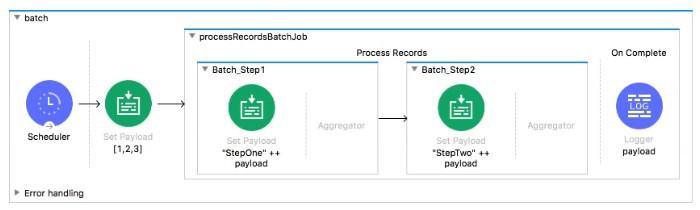
What is the output payload in the On Complete phase
Correct answer:
A. summary statistics with NO record data
Explanation:
Let's break down the Batch Job behavior:
Batch Job Phases: Process Records: Processes individual records through Batch Steps (Batch_Step1, Batch_Step2) On Complete: Runs once after all records have been processed, providing summary statistics about the batch execution (e.g., total records, successful records, failed records)
Key Behavior:
The On Complete phase does not receive the processed record data as payload.
Its payload contains batch job summary information (metadata about the batch execution), not the actual records.
Record data flows only within the Process Records phase through Batch Steps.
What Happens in This Flow:
Scheduler sets payload to [1, 2, 3]
Batch Job starts
Process Records phase:
Each record (1, 2, 3) goes through Batch_Step1 → transforms to "StepOne" ++ payload
Then through Batch_Step2 → transforms to "StepTwo" ++ "StepOne" ++ original
Output would be ["StepTwoStepOne1", "StepTwoStepOne2", "StepTwoStepOne3"]
On Complete phase:
Receives batch summary, NOT the processed records
Contains stats like total records processed, successful count, failed count
Key Concepts Tested:
Batch Job phases (Process Records vs. On Complete)
Data flow in Batch Jobs
Understanding that On Complete receives summary metadata, not record data
Reference:
MuleSoft Documentation: Batch Job On Complete phase provides statistics about batch execution, not the processed records.
Analysis of Other Options:
B. The records processed by the last batch step: Incorrect. This would be the output of the Process Records phase, not the On Complete phase.
C. The records processed by all batch steps: Incorrect. This is also Process Records phase data, not On Complete phase data.
D. The original payload: Incorrect. Neither phase receives the original payload; Process Records receives individual records, On Complete receives summary stats.
Question 5Choose 1
Which of the below functionality is provided by zip operator in DataWeave?
Correct answer:
A. Merges elements of two lists (arrays) into a single list
Explanation:
The zip operator (or function: dw::Core::zip()) in DataWeave is a fundamental array operation:
1. Functionality: It takes two arrays as input and combines them element-by-element, based on their position (index), into a single new array.
2. Output Structure: The resulting array contains sub-arrays (or pairs), where the $i$-th sub-array contains the $i$-th element of the first input array and the $i$-th element of the second input array.
3. Example: If you zip the array ["a", "b"] with the array [1, 2], the result is [["a", 1], ["b", 2]].
4. Size: The resulting array's size is equal to the size of the smallest input array; any trailing elements in the longer array are ignored.
This perfectly matches the description in Option A.
❌ Incorrect Answers B. Used for sending attachments: This functionality is handled by specialized connectors, such as the Email Connector, or by processing multipart/form-data MIME types, which is entirely separate from DataWeave's core transformation logic.
C. Minimize the size of long text using encoding: This describes compression (like GZIP) or encoding (like Base64). Mule applications use the Compression Module for creating compressed files (like .zip files), which is a component/module, not the DataWeave zip operator.
D. All of the above: Incorrect since options B and C are false.
📚 References
DataWeave zip Function: The official MuleSoft documentation for the dw::Core module states that the zip function "Merges elements from two arrays into an array of arrays. The first sub-array in the output array contains the first indices of the input sub-arrays... and so on".
That's the last free question in DataWeave Transformations
You've seen the free 25% of this topic (5 of 22 questions). Get complete access for every question, explanation and the timed exam simulator.
Our timed 2026 Salesforce MuleSoft Developer practice test mirrors the format, number of questions and time limit of the official exam.
The #1 challenge isn't just knowing the material, it's managing the clock. The simulation builds your speed and stamina, so you walk in knowing exactly what to expect.