
Total 184 Questions
Last Updated On : 18-Oct-2026

A developer must create a CreditCardPayment class that provides an implementation of
an existing Payment class.
public virtual class Payment { public virtual void makePayment(Decimal amount) {
/implementation/ } }
Which is the correct implementation?
A. public class CreditCardPayment extends Payment {
B. public class CreditCardPayment implements Payment { public override voidmakePayment(Decimal amount) { /implementation/ } }
C.
D.
Explanation:
Why A (using extends and override) is correct:
Inheritance (extends): In Apex, Payment is defined as a virtual class. Classes that are virtual (or regular classes) are inherited using the extends keyword. The implements keyword is reserved exclusively for interfaces, not classes.
Method Overriding (override): The method makePayment in the parent class is marked as virtual. To provide a subclass-specific implementation of a virtual method, the subclass must explicitly use the override keyword.
Why the other options are incorrect:
Using implements with a class: You cannot use implements on a class unless it is an interface. implements will trigger a compilation error when applied to a class definition.
Reference
Salesforce Apex Developer Guide: Inheritance (Virtual and Abstract Classes)
Salesforce Apex Developer Guide: Overriding Methods
Assuming that naze is 8 String obtained by an 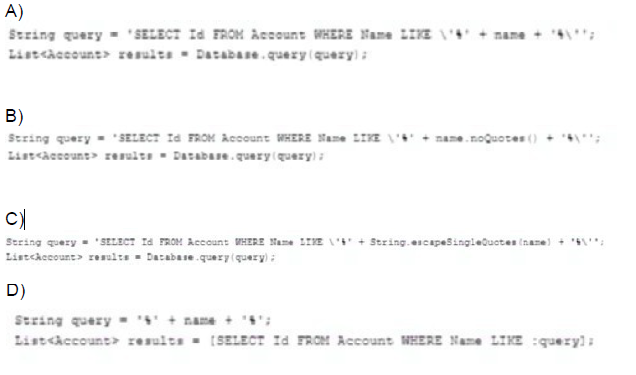
A. Option A
B. Option B
C. Option C
D. Option D
Explanation:
Option C: String.escapeSingleQuotes()
String query = 'SELECT Id FROM Account WHERE Name LIKE \'%' + String.escapeSingleQuotes(name) + '%\'';
List
Why Safe?
String.escapeSingleQuotes() sanitizes the input by escaping single quotes (' → \').
Prevents attackers from breaking the query with malicious input (e.g., name = "test' OR Name != ''").
Option D: Bind Variable
String query = '%' + name + '%';
List
Why Safe?
Bind variables (:query) are automatically escaped by Salesforce.
No string concatenation = no injection risk.
Why Not the Others?
Option A: Unsafe Concatenation
String query = 'SELECT Id FROM Account WHERE Name LIKE \'%' + name + '%\'';
Risk: Direct concatenation allows SOQL injection (e.g., if name = "test' OR Name != ''").
Option B: noQuotes() (Invalid Method)
String query = 'SELECT Id FROM Account WHERE Name LIKE \'%' + name.noQuotes() + '%\'';
Risk: noQuotes() doesn’t exist in Apex. Even if it did, it wouldn’t escape quotes.
Universal Containers wants to back up all of the data and attachments in its Salesforce org once month. Which approach should a developer use to meet this requirement?
A. Use the Data Loader command line.
B. Create a Schedulable Apex class.
C. Schedule a report.
D. Define a Data Export scheduled job.
Explanation: Scheduling a Data Export job is the best way to back up all the data and attachments in a Salesforce org once a month. The Data Export job can be scheduled to run at a certain frequency so that the data can be backed up on a regular basis. This makes it easy to restore the data in case of any emergency.
A developer must perform a complex SQL query that joins two objects in a Lightning
component.
How can the Lightning component execute the query?
A. Create a flow to execute the query and invoke from the Lightning component.
B. Invoke an Apex class with the method annotated as @AuraEnabled to perform thequery.
C. Write the query in a custom Lightning web component wrapper and invoke from theLightning component.
D. Use the Salesforce Streaming API to perform the SQL query.
Explanation:
Why B is correct: Lightning components (both LWC and Aura) run on the client-side (the browser) and do not have direct access to the database or SOQL. To perform database operations, complex queries, or relationships/joins between objects, developers must write server-side Apex code. Exposing an Apex method with the @AuraEnabled annotation makes it callable from the Lightning component.
Why the other options are incorrect:
A (Flow): While Flows can be invoked from Lightning components, writing complex server-side queries or multi-object joins is best practice and most efficiently handled in Apex.
C (LWC wrapper): Client-side components cannot execute database queries directly without a server-side backend.
D (Streaming API): The Streaming API is used for real-time event subscription (such as PushTopics or Change Data Capture), not for executing standard database queries on demand.
Reference:
Salesforce Apex Developer Guide: Using @AuraEnabled Annotation
Lightning Web Components Developer Guide: Calling Apex
A developer is creating a Lightning web component to showa list of sales records. The Sales Representative user should be able to see the commission field on each record. The Sales Assistant user should be able to see all fields on the record except the commission field. How should this be enforced so that the component works for both users without showing any errors?
A. Use WITH SECURITY_ENFORCED in the SOQL that fetches the data for the component.
B. Use Security. stripInaccessible to remove fields inaccessible to the current user.
C. Use Lightning Data Service to get the collection of sales records.
D. Use Lightning Locker Service to enforce sharing rules and field-level security.
Explanation:
To ensure that the Lightning Web Component (LWC) displays only the fields the current user is allowed to see, based on field-level security (FLS), you should use:
✅ Security.stripInaccessible() in Apex
This method:
Removes fields from queried records that the user doesn’t have read access to
Ensures the component does not throw errors or expose restricted data
Allows a single Apex method to return different sets of data depending on user permissions
🔍 Example:
List
salesRecords = (List
return salesRecords;
❌ Why other options are incorrect:
A. Use WITH SECURITY_ENFORCED
❌ This will throw a runtime exception if a user lacks access to a field in the query.
Not ideal when you want to show partial data based on user permissions.
C. Use Lightning Data Service
❌ LDS respects FLS but is typically used for single-record forms, not for querying lists of records.
D. Use Lightning Locker Service
❌ Locker Service is a security layer for JavaScript isolation, not for enforcing data visibility or FLS.
Universal Containers has a Visualforce page that displays a table of every Container c being rented by a given Account. Recently this page is failing with a view state limit because some of the customers rent over 10,000 containers. What should a developer change about the Visualforce page to help with the page load errors?
A. Use JavaScript remotlng with SOQL Offset.
B. Implement pagination with a StandardSetController.
C. Implement pagination with an OffaetController.
D. Use lazy loading and a transient List variable.
Explanation:
The issue here is that the Visualforce page is exceeding the View State limit because it's trying to display a very large dataset (10,000+ Container__c records). To fix this efficiently, the developer should:
✅ Use a StandardSetController to paginate the data.
This approach:
Loads and displays a subset of records at a time (e.g., 50 per page)
Keeps the view state small and manageable
Is the most declarative and Salesforce-recommended way to paginate in Visualforce
🔍 Example:
public with sharing class ContainerPaginationController {
public ApexPages.StandardSetController setCon {
get {
if (setCon == null) {
setCon = new ApexPages.StandardSetController(
[SELECT Id, Name FROM Container__c WHERE Account__c = :ApexPages.currentPage().getParameters().get('id')]
);
setCon.setPageSize(50);
}
return setCon;
}
set;
}
public List
return (List
}
}
❌ Why other options are less appropriate:
A. JavaScript Remoting with SOQL OFFSET
❌ OFFSET is inefficient at large scale (10,000+ records)
Also requires custom JavaScript and Apex code
C. OffsetController
❌ Not a standard Salesforce controller — likely refers to a custom implementation, which is more complex and error-prone
D. Lazy loading and transient List
❌ transient helps reduce view state, but by itself won’t fix the issue
Lazy loading requires custom logic, still won't handle paging automatically
When importing and exporting data into Salesforce, which two statements are true? Choose 2 answers
A. Bulk API can be used to import large data volumes in development environments without bypassing the storage limits.
B. Bulk API can be used to bypass the storage limits when importing large data volumes in development environments.
C. Developer and Developer Pro sandboxes have different storage limits.
D. Data import wizard is a client application provided by Salesforce.
Explanations:
A. Bulk API & Storage Limits
True. Bulk API is optimized for large data volumes (up to 10k records/batch) but does not bypass storage limits.
Storage limits (e.g., data, file storage) are enforced in all environments, including sandboxes.
C. Sandbox Storage Limits
True. Salesforce sandboxes have tiered storage:
Developer Sandbox: 200 MB data + 200 MB file storage.
Developer Pro Sandbox: 1 GB data + 1 GB file storage.
Why the Others Are False:
B. Bulk API Bypassing Limits
False. No tool (Bulk API, Data Loader, etc.) can bypass Salesforce storage limits.
D. Data Import Wizard as a Client App
False. The Data Import Wizard is a built-in Salesforce UI tool (accessible via Setup), not a separate client application.
A developer wants to import 500 Opportunity records into a sandbox. Why should the developer choose to use data Loader instead of Data Import Wizard?
A. Data Loader runs from the developer's browser.
B. Data Import Wizard does not support Opportunities.
C. Data Loader automatically relates Opportunities to Accounts.
D. Data Import Wizard cannot import all 500 records.
Explanation:
The Data Import Wizard is a user-friendly, web-based tool in Salesforce, but it has limited object support. Specifically:
🔹 The Data Import Wizard does not support importing Opportunity records.
Instead, it supports standard objects like:
Leads
Contacts
Accounts
Campaign Members
Custom objects
To import Opportunities, a developer must use a tool like the Data Loader.
❌ Why the other options are incorrect:
A. Data Loader runs from the developer's browser
❌ False: Data Loader is a client application that runs on your desktop, not in a browser.
C. Data Loader automatically relates Opportunities to Accounts
❌ False: You must explicitly map the AccountId field or provide matching criteria — it doesn’t happen automatically.
D. Data Import Wizard cannot import all 500 records
❌ False: It can handle more than 500 records — limits depend on the object and user profile, but 500 is well within its capacity.
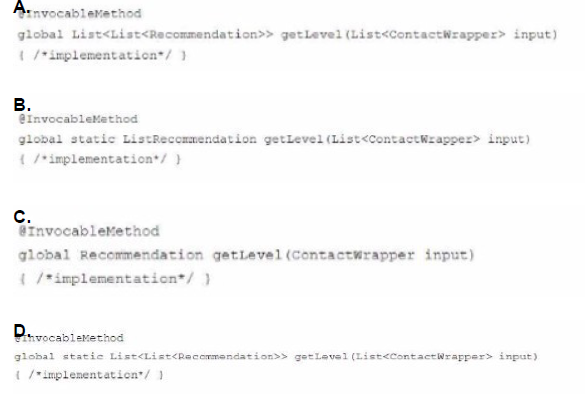
A Next Best Action strategy uses an Enhance element that invokes an Apex method to determine a discount level for a Contact, based on a number of factors. What is the correct definition of the Apex method?
A. Option A
B. Option B
C. Option C
D. Option D
Explanation:
In Next Best Action (NBA) with Einstein Recommendations, when using the Enhance element to call an Apex method, the method must meet specific requirements defined by the InvocableMethod interface.
🔒 Requirements for @InvocableMethod used with Enhance:
Must be global static
Must accept a List
Must return a List
NBA expects multiple recommendation results per input record
🔍 Why Option D is correct:
✅ Uses @InvocableMethod
✅ Declared as global static
✅ Input is List
✅ Output is List
❌ Why the other options are incorrect:
A. Missing static keyword → ❌
B. Return type is List
C. Input is not a list, return type is a single object → ❌
Given the following Anonymous Block: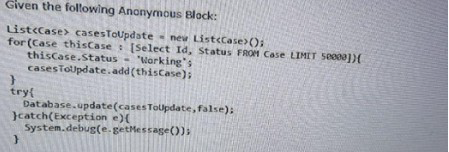
Which one do you like?
What should a developer consider for an environment that has over 10,000 Case records?
A. The transaction will fail due to exceeding the governor limit.
B. The try/catch block will handle any DML exceptions thrown.
C. The transaction will succeed and changes will be committed.
D. The try/catch block will handle exceptions thrown by governor limits.
Explanation:
The anonymous block attempts to query and update 50,000 Case records:
for(Case thisCase : [SELECT Id, Status FROM Case LIMIT 50000]){
thisCase.Status = 'Working';
casesToUpdate.add(thisCase);
}
Then it performs a bulk update:
Database.update(casesToUpdate, false);
However, Salesforce enforces a strict governor limit:
❗ Maximum DML rows per transaction: 10,000
This code updates 50,000 records, which exceeds the limit, and will cause the transaction to fail with a "Too many DML rows" exception.
❌ Why the other options are incorrect:
B. The try/catch block will handle any DML exceptions thrown
❌ Partially true — it can catch exceptions, but governor limit exceptions are uncatchable once hit.
C. The transaction will succeed and changes will be committed
❌ False — It will exceed the 10,000 DML rows limit and fail.
D. The try/catch block will handle exceptions thrown by governor limits
❌ False — Governor limit exceptions are not catchable. Once a limit is hit, the transaction is immediately halted.
| Page 4 out of 19 Pages |
| 123456 |
| Salesforce-Platform-Developer Practice Test Home |
Our new timed 2026 Salesforce-Platform-Developer practice test mirrors the exact format, number of questions, and time limit of the official exam.
The #1 challenge isn't just knowing the material; it's managing the clock. Our new simulation builds your speed and stamina.
You've studied the concepts. You've learned the material. But are you truly prepared for the pressure of the real Salesforce Certified Platform Developer - Plat-Dev-201 exam?
We've launched a brand-new, timed Salesforce-Platform-Developer practice exam that perfectly mirrors the official exam:
✅ Same Number of Questions
✅ Same Time Limit
✅ Same Exam Feel
✅ Unique Exam Every Time
This isn't just another Salesforce-Platform-Developer practice questions bank. It's your ultimate preparation engine.
Enroll now and gain the unbeatable advantage of:

Copyright © - All Rights Reserved