A developer needs tocreateDataRaptor to retrieve the name of an account for a contact.
Following best practices, how should a developer configure the extraction steps?
Correct answer:
A. Define an extraction step for the Contact object and set the Extract JSON Path to Contact Account.Name
Summary
The requirement is to retrieve a field (Name) from a parent object (Account) for a starting record (Contact). In a DataRaptor, this is accomplished by leveraging a lookup relationship. The correct approach is to define the extraction starting from the source object (Contact) and then use a JSON Path that traverses the relationship field (Account) to the target field (Name), without needing separate extraction steps for each object.
Correct Option
A. Define an extraction step for the Contact object and set the Extract JSON Path to Contact.Account.Name
This is the correct and most efficient best practice. A single DataRaptor Extract step starting from the Contact object can traverse the Account relationship to get the Account.Name using the JSONPath Contact.Account.Name. The DataRaptor internally handles the SOQL join, eliminating the need for multiple, manually configured extraction steps and simplifying the configuration.
Incorrect Option
B. Define extraction steps for the Contact and the Account objects, and set the Extract JSON Path to Contact.Account.Name
This is redundant and not a best practice. Defining a separate step for the Account object is unnecessary because the relationship from Contact to Account can be traversed directly in the JSON Path within a single step. Multiple steps would complicate the DataRaptor without providing any benefit for this simple lookup.
C. Define extraction steps for the Contact and the Account objects, and set the Extract JSON Path to Account.Name
This is incorrect. The JSON Path Account.Name is not rooted in the starting object of the extraction. The first step is based on the Contact object, so the pipeline data at that point is a Contact record. Referring directly to Account.Name without the Contact. prefix would be invalid as the context is wrong.
D. Define an extraction step for the Account object, and set the Extract JSON Path to Account.Contact.Name
This reverses the relationship logic. The requirement is to start from a Contact and get its parent Account's name. This option starts from the Account and tries to traverse to a child Contact (Account.Contact.Name), which is not a standard relationship and would not work. The relationship is Contact.Account, not Account.Contact.
Reference
Salesforce OmniStudio Developer Guide: Configure a DataRaptor Extract
Question 2Select all that apply
A developer creates a DataRaptor Extract to retrieve data to pass to an external service. The external service expects the field value to be an integer. However, the DataRaptor is sending it as a string.
Which action can the developer take to fix this?
Correct answer:
D. In the DataRaptor Formula tab, define a formula using the function TOINTEGER and usethe formula as output.
Summary
The issue is a data type mismatch where a field value extracted from Salesforce is being cast as a string in the resulting JSON, but the external service requires an integer. The solution requires actively converting the data type before it is placed in the output. This type conversion is not handled by simple configuration in the Output tab but requires a data manipulation step.
Correct Option
D. In the DataRaptor Formula tab, define a formula using the function TOINTEGER and use the formula as output.
This is the correct and most direct solution. The Formula tab allows you to apply functions to your data. By creating a formula that uses the TOINTEGER() function on the source field, you explicitly convert the string value to a number. You then map this formula's result to the output field instead of the original source field, ensuring the JSON contains an integer.
Incorrect Option
A. In the DataRaptor Output tab, select the Output Data Type of that field to Integer.
The "Output Data Type" dropdown in the Output tab (e.g., String, Number, Boolean) is primarily for documentation and has limited functional impact on the actual JSON structure for basic extracts. It does not reliably perform type conversion. The field will often still be serialized as a string in the final JSON output.
B. In the DataRaptor Output tab, enter the default value as 0 on the field.
Setting a default value only provides a fallback if the source field is null or empty. It does not change the data type of an existing value. If the source field contains the string "123", the default value is ignored, and "123" is still sent as a string. This does not solve the type conversion problem.
C. In the DataRaptor Extract tab, set the Input Data Type field to Integer.
The "Input Data Type" in the Extract tab defines the data type of the parameters being passed into the DataRaptor (e.g., the filter value). It has no effect on the data type of the fields being extracted from the Salesforce object and output by the DataRaptor.
Reference
Salesforce OmniStudio Developer Guide: DataRaptor Formula Functions
Question 3Choose 1
A developer needs to limit the of a DataRaptor Extract to a maximum of one result. How should the developer configure this?
Correct answer:
C. Use the LIMIT filter on the Extract definition
Summary
To limit the number of records returned by a DataRaptor Extract, the configuration must be applied within the DataRaptor itself. This ensures the limit is enforced at the database query level, which is the most efficient approach. Applying the limit at the source reduces the data volume processed by the platform and guarantees that only the specified number of records is ever retrieved, regardless of how the DataRaptor is called.
Correct Option
C. Use the LIMIT filter on the Extract definition
This is the correct and most efficient method. In the DataRaptor Extract's configuration, under the "Filter" section, you can add a LIMIT clause. Setting this to 1 ensures the underlying SOQL query includes LIMIT 1, so the database returns only one record at most. This is a best practice as it optimizes performance by restricting results at the source.
Incorrect Option
A. Define a formula with the Filter function
Formula functions operate on data after it has been retrieved from the database. Using a FILTER function would first fetch all records matching the query and then apply the limit in memory. This is inefficient for large data sets and does not prevent the performance cost of initially retrieving multiple records.
B. Use a Custom Output Type when creating the DataRaptor
The Custom Output Type determines the structure of the returned JSON (e.g., "SObject" vs. "Custom"). It does not have a setting to limit the number of records returned by the query. This configuration is unrelated to result set sizing.
D. Set the Limit Property on the Action that calls the DataRaptor Extract.
There is no standard "Limit" property on the Integration Procedure or OmniScript action that calls a DataRaptor. The limiting logic must be defined within the DataRaptor's own configuration. The calling action can pass parameters to the DataRaptor but cannot directly impose a row limit on its results.
Reference
Salesforce OmniStudio Developer Guide: Configure a DataRaptor Extract
Question 4Choose 1
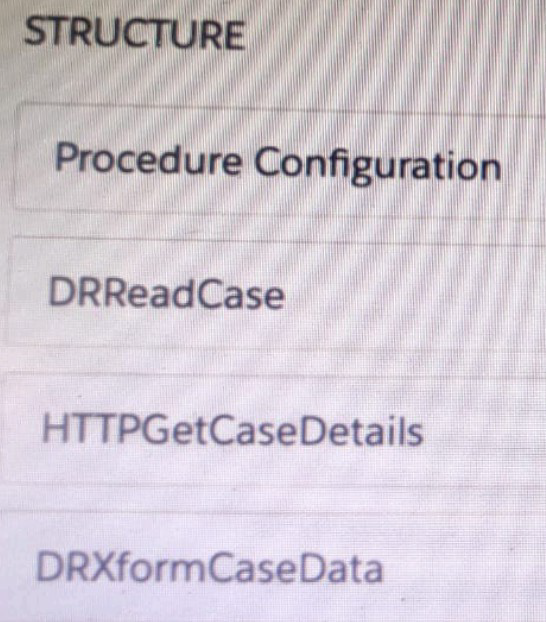
Refer to the exhibit below. What is the marge code needed for this integration procedure structure to pass a CaseNumber node from theDRReadCase DataRaptor Extract Action to the HTTP Action’s HTTP URL?
Correct answer:
A. %DRReadCase: CaseNumber%
Summary
In an Integration Procedure, data is passed between actions through a data pipeline. To reference an output from a previous action, you use a merge field syntax. The correct syntax follows a specific pattern that identifies the source action and the specific data node you want to access. This allows you to dynamically build values, such as a URL, with data retrieved earlier in the procedure's execution.
Correct Option
A. %DRReadCase:CaseNumber%
This is the correct merge field syntax for referencing data from a previous action within an Integration Procedure. It uses percent signs % to denote the merge field, followed by the name of the previous action (DRReadCase), a colon :, and the name of the specific output node from that action (CaseNumber). This tells the Integration Procedure to insert the value of the CaseNumber from the DRReadCase action's output into the HTTP URL.
Incorrect Option
B. ((DRRCase,CaseNumber))
This syntax is invalid. It uses parentheses and a comma, which are not part of the standard merge field syntax in Integration Procedures. The correct format uses percent signs and a colon as the delimiter.
C. %HTTPGetCaseDetails:CaseNumber%
This is incorrect because it references the HTTPGetCaseDetails action, which is the action that needs the value, not the action that provides it. The DRReadCase action occurs before HTTPGetCaseDetails in the procedure flow, so only DRReadCase's output is available at the time the HTTP Action is configured.
D. ((CaseNumber))
This syntax is incomplete and incorrect. It does not specify which action in the procedure is the source of the CaseNumber data. Without specifying the source action (e.g., DRReadCase), the Integration Procedure cannot resolve where to get the value from.
Reference
Salesforce OmniStudio Developer Guide: Integration Procedure Data Pipelining
That's the last free question in Data Mappers
You've seen the free 25% of this topic (4 of 17 questions). Get complete access for every question, explanation and the timed exam simulator.
Our timed 2026 OmniStudio Developer practice test mirrors the format, number of questions and time limit of the official exam.
The #1 challenge isn't just knowing the material, it's managing the clock. The simulation builds your speed and stamina, so you walk in knowing exactly what to expect.