A healthcare company wants to enable its subscribers to add, edit, or delete dependents
related to their policy via their Community portal. The developer on the project decides to
use an OmniScript.
How should the developer configure the OmniScript to provide this functionality?
Correct answer:
A. Use an Edit Block element configured with Remote Actions.
Explanation:
For allowing Community users to add, edit, and delete dependents linked to a policy, the best OmniScript component is:
✔ Edit Block
Built specifically for managing repeating records (create, update, delete).
Ideal for scenarios like dependents, addresses, contacts, etc.
Automatically supports Add, Edit, Remove functions for each row.
✔ Remote Actions
Remote Actions allow the OmniScript to:
Retrieve dependent records
Update or create new dependents
Delete dependents via Apex or Integration Procedures, making it secure for Community users.
Why the other options are incorrect: B. Text Block + Remote Action
❌ Text Blocks cannot handle editable list data.
C. Input Block + Data Mapper Post
❌ Input Blocks collect input but cannot support add/edit/delete rows dynamically.
D. Edit Block + SOQL
❌ Direct SOQL in OmniScript is not a best practice and not supported. Data retrieval must use DataRaptors, Integration Procedures, or Remote Actions.
Question 2Choose 1
A developer creates an OmniScript to update billing information. After analyzing the
different types of customer interactions that occur at the company, the developer
determines updating billing information should be included in the majority of customer
interactions.
What should the developer use to configure the action that invokes the OmniScript?
Correct answer:
A. OmniScript Action
Explanation
If an OmniScript (OS) needs to be reused across many customer interactions—especially as a common step like updating billing information—the correct way to invoke it is using an OmniScript Action.
Why OmniScript Action?
An OmniScript Action allows you to:
- Launch one OmniScript from another
- Reuse a common OmniScript as a sub-flow
- Maintain consistency across multiple customer journeys
- Avoid duplicating logic
This is the intended approach when a process (like billing updates) is reusable and shared across many user flows.
❌ Why the others are incorrect
B. Custom Action
Custom Actions are used mainly in FlexCards, not OmniScripts.
They are for FlexCard buttons, not for embedding or reusing an OmniScript.
C. Lightning Action
Lightning Actions are for Salesforce Lightning pages, not for assembling OmniScripts together. They don’t enable reuse inside OmniScripts.
Question 3Choose 1
A developer is configuring an integration Procedure Action in an OmniScript. The Omniscript needs a JSON response from the Integration Procedure but does not need to wait for the response for the user to proceed. Which feature should the developer enable?
Correct answer:
C. Invoke Mode Fire and Forget
Explanation:
This question tests your knowledge of the different Invoke Modes for an Integration Procedure Action within an OmniScript and their impact on the user experience and data flow.
The key requirements are:
- The OmniScript needs to call the Integration Procedure.
- The OmniScript does not need to wait for the response for the user to proceed.
This describes an asynchronous operation where the backend process is decoupled from the user's navigation through the script.
Let's analyze each option:
A. Use Future: This is incorrect. "Use Future" is a property within an Integration Procedure step (like a DataRaptor Transform or HTTP Action) that makes that specific step asynchronous on the server. It does not control the behavior of how the OmniScript interacts with the IP. The OmniScript would still wait for the entire IP to report back its final status.
B. Invoke Mode Non-Blocking: This is incorrect. "Non-Blocking" is a legacy term. In modern OmniStudio, the equivalent and precise setting is "Fire and Forget." Using the specific terminology from the product is crucial for the exam.
C. Invoke Mode Fire and Forget: This is the correct answer. When you set the Invoke Mode of an Integration Procedure Action to "Fire and Forget", the OmniScript sends the request to the IP and immediately continues to the next step without waiting for a response. The user can proceed with the OmniScript uninterrupted. The IP executes in the background. This perfectly matches the requirement that the user does not need to wait.
D. Toast Completion: This is incorrect. "Toast Completion" is a feature that, when enabled, displays a temporary notification message (a "toast") to the user upon the successful completion of the action. It is a UI feedback mechanism, not a control for the execution flow. The script would still wait for the IP to finish before showing the toast and proceeding, which violates the "does not need to wait" requirement.
Summary
The Invoke Mode on an Integration Procedure Action controls the OmniScript's waiting behavior:
- Blocking (Default): The OmniScript pauses and waits for the IP to fully complete and return a response before moving forward.
- Fire and Forget: The OmniScript triggers the IP and moves on immediately. It does not receive any response data from the IP, and any errors in the IP are not reported back to the OmniScript.
Therefore, to allow the user to proceed without waiting for the JSON response, the developer must enable Invoke Mode: Fire and Forget.
Question 4Choose 1
A developer builds a new OmniScript. It contains aSet Values element with a ContextId key/value pair that was used during testing.
What should the developer do before moving the OmniScript to a production org?
Correct answer:
C. Delete or Deactivate the Set Values element.
Summary
A Set Values element with a hardcoded ContextId is a common technique used for testing an OmniScript in a development or sandbox environment, as it allows the developer to simulate working with a specific record. However, hardcoded IDs are org-specific and will be invalid in a production org. Leaving such testing artifacts in a production-bound component is poor practice and will cause runtime errors.
Correct Option
C. Delete or Deactivate the Set Values element.
This is the correct and safest course of action. The Set Values element with the hardcoded ContextId was a testing scaffold, not part of the actual business logic. Before promoting to production, this testing element should be removed entirely (deleted) or, if it contains other necessary values, deactivated so it does not execute. The production OmniScript should receive its context (like a Record Id) dynamically from the launching point (e.g., a FlexCard, Lightning record page, or Community), not from a hardcoded value.
Incorrect Option
A. Update the ContextId value to specify an id from the Production org.
This is an anti-pattern and should never be done. Hardcoding any record ID in a component makes it non-portable and brittle. The ID will likely not exist in all target orgs, and even if it does, the script will only work for that single record, which is not the intended behavior.
B. Add a Show/Hide condition on the Set Values element.
Adding a condition does not solve the core problem. The element would still be present in the configuration. If the condition were to somehow evaluate to false in production, the ContextId would never be set, breaking the script's logic that depends on it. The correct approach is to remove the testing artifact, not to hide it.
D. Deactivate the contextId key/value pair
Most Set Values elements do not have an activation checkbox for individual key/value pairs. Even if this were possible, it would leave behind unnecessary configuration clutter. The entire purpose of the element was for testing, so the cleanest and most correct practice is to remove the element itself.
Reference
Salesforce OmniStudio Developer Guide: OmniScript Best Practices
Question 5Choose 1
A developer needs to build a multi-step intake form. Each step must allow the user to cancel the intake at any time. The developer is using an LWC OmniScript to build the form.
How should the developer implement thecancel functionality for all steps using the LWC OmniScript Designer?
Correct answer:
A. Check the Enable Cancel checkbox in the Setup tab under Cancel Options.
Summary
Implementing a global cancel functionality that is available across all steps of an OmniScript requires a configuration at the script level, not by adding individual elements to each step. The LWC OmniScript provides a built-in mechanism for this in its setup configuration. This approach ensures consistency, reduces repetitive configuration, and leverages the framework's native navigation controls.
Correct Option
A. Check the Enable Cancel checkbox in the Setup tab under Cancel Options.
This is the correct and most efficient method. In the OmniScript's Setup tab, there is a section for Cancel Options. Checking the "Enable Cancel" checkbox activates a global cancel button in the OmniScript's header. This button is available on every step without any need for the developer to manually add navigation elements, ensuring consistent cancel functionality throughout the entire multi-step form.
Incorrect Option
B. Add a navigation Action inside each step and set the Component name to ‘’Cancel’’
This is inefficient and error-prone. It would require manually adding the same element to every single step. Furthermore, the "Component Name" property is not used to define a cancel action; it is related to the underlying Lightning Web Component type.
C. Add a navigation Action outside each step and set the Element Name to ‘’Cancel’’
Navigation elements cannot be placed outside of a step. All actionable elements must reside within a Step element in the OmniScript structure. This configuration is not possible.
D. Add a navigation Action inside each step and set the Element Name to ‘’Cancel’’
While this would technically work by placing a button in every step, it is a manual, repetitive process that violates the DRY (Don't Repeat Yourself) principle. It is not the best practice when a simple, global configuration option ("Enable Cancel") exists to achieve the same result more reliably and with less effort.
A developer is building an OmniScript and needs to retrieve data from a single field in a Salesforce record.
Which OmniScript element does this?
Correct answer:
A. Lookup
Summary
The requirement is to retrieve data for a single field from a Salesforce record directly within an OmniScript. This is a common need for populating a field based on a selected record ID, such as getting an Account's phone number after an Account Id is entered. The element must perform a lightweight, real-time data lookup without the overhead of a full DataRaptor or external call.
Correct Option
A. Lookup
The Lookup element is specifically designed for this purpose. It is a dual-purpose element that provides a searchable interface to find a record and, upon selection, can automatically populate other fields on the OmniScript with data from that selected record. Its "Pre-fill Field Mappings" property allows a developer to map a field from the selected record (e.g., Account.Phone) to a field in the OmniScript, efficiently retrieving the value for a single field.
Incorrect Option
B. Select
The Select element is used to present a static or dynamically sourced list of options for a user to choose from (like a picklist). It does not perform a real-time data retrieval from a Salesforce record based on an ID. It is for user selection, not for auto-populating field values from a database.
C. HTTP Action
An HTTP Action is used to call an external REST API or web service. It is not the right tool for a simple, internal data retrieval from a Salesforce record. Using it for this purpose would be overly complex, require custom Apex, and violate the principle of using the simplest tool for the job.
D. DataRaptor Post Action
A DataRaptor Post Action is used to create, update, or upsert records in the database. It is a data loading tool, not a data retrieval tool. For extracting a single field value, a DataRaptor Extract would be more appropriate, but even that is more heavyweight than a Lookup element for this specific single-field use case.
Reference
Salesforce OmniStudio Developer Guide: Lookup Element
Question 7Choose 1
A developer writes an OmniScript that includes a DataRaptor that updates the Account status based on information provided from the OmniScript. The information must be updated only if the Account record already exists. Otherwise, a new account must be created.
How should the developer accomplish this task?
Correct answer:
B. Check the Upsert Key and Is Required for Upsert check boxes on the Account Id field
Summary
The requirement is to update an existing Account if it exists, or create a new one if it does not. This is the definition of an "upsert" operation. In a DataRaptor Load, an upsert requires specifying a unique field to match on (the Upsert Key). The Account Id (the Salesforce record ID) is the standard field for this, as it uniquely identifies an existing record. If provided, the record is updated; if not, a new one is created.
Correct Option
B. Check the Upsert Key and Is Required for Upsert checkboxes on the Account Id field
This is the correct configuration. Checking Upsert Key on the Account Id field tells the DataRaptor to use this field to find an existing record. Checking Is Required for Upsert ensures the upsert logic is dependent on this field. If the OmniScript provides an Account Id, the existing record is updated. If the Account Id is null/empty, the DataRaptor will create a new Account record, fulfilling the requirement.
Incorrect Option
A. Check the Upsert Key checkbox on the Account Status field
Using the "Account Status" field as the Upsert Key is incorrect. The upsert key must be a unique identifier for the record, like the Id or a custom external ID field. "Account Status" is a data field that is not unique, so using it as a key would cause errors or update the wrong record if multiple accounts shared the same status.
C. Populate the Lookup Object and Lookup Fields
The Lookup fields in a DataRaptor are used to populate a relationship field on the record being saved (e.g., looking up a Contact to set the AccountId on an Opportunity). They are not used to determine whether to update an existing record or create a new one. This is unrelated to the upsert operation.
D. Check Overwrite Target for All Null Inputs checkbox on the Account Id field
This setting controls how null values from the input are handled during an update. If checked, a null input would overwrite an existing value on the target record with null. It has no bearing on the core logic of deciding between an insert or an update (upsert).
Reference
Salesforce OmniStudio Developer Guide: Configure a DataRaptor Load
Question 8Choose 2
Which two of these options can a developer use to retrieve data from a Salesforce object? (Choose 2 answers)
Correct answer:
B. A DataRaptor Extract Action
C. A Lookup Input Element
Summary
Retrieving data from a Salesforce object involves querying and reading records. In OmniStudio, specific tools are designed for this purpose. The correct options will be components whose primary function is to fetch data from the database and make it available within the OmniScript or Integration Procedure, as opposed to components designed for writing data or capturing user input.
Correct Option
B. A DataRaptor Extract Action
This is a primary tool for data retrieval. A DataRaptor Extract is explicitly designed to read data from one or more Salesforce objects. It can be configured with SOQL-like filters and relationships to return specific sets of data, which can then be used to populate an OmniScript or be processed within an Integration Procedure.
C. A Lookup Input Element
The Lookup element serves a dual purpose. While it provides a user interface to search for a record, it also automatically retrieves and pre-fills data from the selected record into other fields on the OmniScript. This inherently involves querying and reading data from a Salesforce object based on the user's selection.
Incorrect Option
A. A DataRaptor Load Action
A DataRaptor Load Action is used for writing data to the database. Its purpose is to create, update, or upsert records in a Salesforce object. It does not retrieve data for use in the application; it persists data from the application to the database.
D. A DataRaptor Post Action
This is not a standard OmniStudio action type. "DataRaptor Post" is likely a distractor and is not a recognized category. DataRaptors are categorized as Extract, Transform, or Load. There is no "Post" type, and if it refers to anything, it would be synonymous with a Load action, which is for data creation/update, not retrieval.
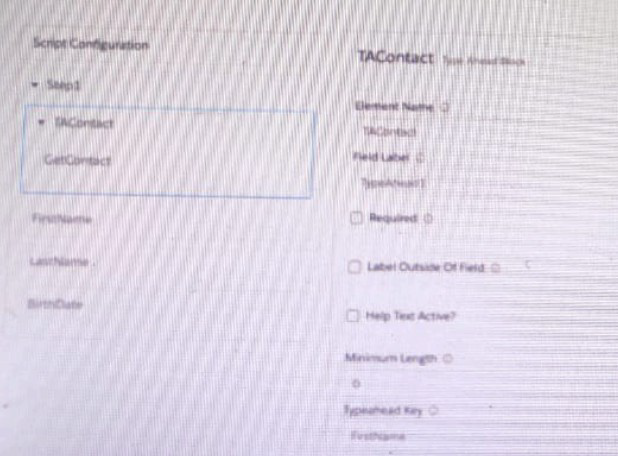
A developer creates an OmniScript display FirstName, LastName, and BirthDate of a contact using a Type Ahead Block. The DataRaptor used in the Type Ahead has been tested and fetches the correct data.
When previewing Omniscript, the developer enters a name in the Type Ahead and makes a selection of a contact from the list. However, the text fields FirstName. LastName, and BirthDate are notgetting populatedwith the data.
What is the reason that the fields fail to display the fetched data?
Correct answer:
C. FirstName, LastName, andBirthdateare not placed inside the Type ahead Block.
Summary
A Type Ahead Block is a container element designed to manage a set of related fields for a single record. For child elements like FirstName, LastName, and BirthDate to be automatically populated when a selection is made from the type-ahead dropdown, they must be placed inside the Type Ahead Block in the OmniScript structure. This allows the block to manage the data context and mapping for all its child elements based on the selected record.
Correct Option
C. FirstName, LastName, and Birthdate are not placed inside the Type Ahead Block.
This is the most likely cause. The Type Ahead Block functions as a data context container. When a user selects a record from the dropdown, the block receives the full data object for that record. It then automatically populates the values of all input elements (like Text and Date elements) that are placed inside it, provided their "Data JSON Path" matches a field in the returned data. If these elements are outside the block, they are not part of this automatic data mapping and will remain empty.
Incorrect Option
A. Lookup Mode is not selected in the properties of the Type Ahead Block.
"Lookup Mode" is a property of the standalone Lookup element, not the Type Ahead Block. The Type Ahead Block does not have a "Lookup Mode" property. This option confuses two different OmniScript elements.
B. Use Data JSON is not selected in the properties of the Type Ahead Block.
The "Use Data JSON" property is typically found on elements like the Select element to define a remote data source. The Type Ahead Block's configuration is centered around its "Data Source" (e.g., a DataRaptor) and the placement of child elements, not a "Use Data JSON" checkbox.
D. The Type Ahead key is not in the correct format.
The "Type Ahead Key" property is used to specify which field from the fetched data should be displayed in the main input field and used for filtering. If this were incorrectly formatted, the dropdown list itself would not populate with options correctly. The scenario states that the developer can "make a selection of a contact from the list," indicating the key is working and the list is populating. The issue is with populating other fields after the selection, which is a separate mechanism.
Reference
Salesforce OmniStudio Developer Guide: Type Ahead Block Element
Question 10Choose 2
A developer isbuilding an OmniScript and needs to retrieve data from Salesforce and from an on-premises billing database.
Which two OmniScript elements could retrieve this data?
(Choose 2 answers)
Correct answer:
B. DataRaptor Extract Action
C. HTTP Action
Summary
The requirement involves retrieving data from two different sources: Salesforce (internal) and an on-premises database (external). An OmniScript must use different elements to interact with these distinct systems. One element is designed for internal Salesforce data queries, while another is designed for communicating with external systems via web services.
Correct Option
B. DataRaptor Extract Action
This element is specifically designed to retrieve data from Salesforce objects. A DataRaptor Extract can be configured with SOQL queries and relationships to efficiently fetch data from within the Salesforce database, making it the correct tool for the internal data retrieval requirement.
C. HTTP Action
This element is used to call external REST APIs or web services. To access an on-premises billing database, you would typically create a middleware API endpoint that connects to the database. The HTTP Action in the OmniScript would then call this external endpoint to retrieve the required billing data, making it the correct tool for the external data retrieval requirement.
Incorrect Option
A. Navigate Action
The Navigate Action is used to control the user's flow within the OmniScript, such as moving to the next step or a different step set. It does not retrieve data from any source, whether internal or external.
D. Response Action
The Response Action is used at the end of an Integration Procedure to structure and send data back to the calling OmniScript. It is an output element, not a data retrieval element. It does not fetch data from Salesforce or external systems itself.
Our timed 2026 OmniStudio Developer practice test mirrors the format, number of questions and time limit of the official exam.
The #1 challenge isn't just knowing the material, it's managing the clock. The simulation builds your speed and stamina, so you walk in knowing exactly what to expect.