
Question 11
Choose 1
A developer is creating anOmniScript that Provisions trial orgs to their customers. The following text block in the OmniScript uses a merge code to display the ID for the new trial org:
Welcome to Salesforce
Your ID is %Details: Customer10:ID%
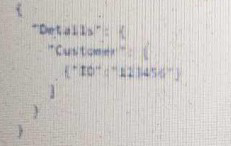
During testing, the developer noticesthat the ID does not display. The data JSON is structured as shown below.
How should the developer correct the merge code in order for the ID to display?
Welcome to Salesforce
Your ID is %Details: Customer10:ID%
During testing, the developer noticesthat the ID does not display. The data JSON is structured as shown below.
How should the developer correct the merge code in order for the ID to display?
Correct answer:
A. To %%Details:Customer|0:ID%%
Summary
The issue is that the Customer node in the JSON structure is an array (indicated by the square brackets []), not a single object. To access a field from a specific record within an array, you must specify the index of that record using the pipe and index syntax |index. Array indices start at 0, so the first element in the array is at index 0.
Correct Option
A. To %%Details:Customer|0:ID%%
This is the correct merge field syntax. Details:Customer|0:ID breaks down as follows:
Details: The parent node.
Customer: The array node.
|0: The index specifier, targeting the first element in the Customer array.
ID: The target field within that specific array element.
Using %%...%% is the correct syntax for merge fields in an OmniScript Text Block.
Incorrect Option
B. To %%Details:Customer|n:ID%
Using |n is not valid syntax. The index must be a specific numerical value (e.g., 0, 1, 2) to pinpoint a single element within the array. The placeholder n will not resolve and will cause the merge field to fail.
C. To %%Details:Customer|1:ID%
While the syntax |1 is valid for accessing the second element in an array (since indices start at 0), the provided JSON structure shows only one object in the Customer array. Therefore, index 1 is out of bounds, and no data would be found.
D. To$Details:Customer|0:ID$
This uses the wrong delimiters for a merge field in an OmniScript Text Block. The correct delimiters are percent signs %%...%%, not dollar signs $...$. Using incorrect delimiters means the text will be treated as plain text, and the value will not be merged.
Reference
Salesforce OmniStudio Developer Guide: Merge Fields