Free Salesforce Platform Developer Practice Test Questions
184 questionsUpdated 23-Nov-20266 topics
Preparing with this Salesforce Platform Developer practice test is essential to ensure success on the exam. It lets you get familiar with the Salesforce Platform Developer question format and identify your strengths and weaknesses, so you can maximise your chances of passing the Salesforce certification exam on your first attempt. Start with the free Salesforce Platform Developer - Plat-Dev-201 sample questions below, or use the timed simulator for full exam practice.
Surveys from different platforms and user-reported pass rates suggest Salesforce Platform Developer - Plat-Dev-201 practice exam users are ~30-40% more likely to pass.
TopicDeveloper Fundamentals
Question 1Choose 1
Universal Containers wants a list button to display a Visualforce page that allows users
to edit multiple records.
Which Visualforce feature supports this requirement?
Correct answer:
D. Standard controller and the recordSetVar page attribute
Explanation:
Why D is correct:
To build a Visualforce page capable of handling, displaying, and editing a list of multiple records, such as when launching from a list view action button, developers use a Standard Controller combined with the recordSetVar attribute. The recordSetVar attribute defines a collection or set of records, turning the standard controller into a Standard Set Controller, which natively supports multi-record selection, iteration components such as , and bulk updates.
Why the other options are incorrect:
A & B:
A "Custom List Controller" is not a native framework feature. Standard list management is handled natively through the built-in standard controller coupled with recordSetVar.
C:
A plain standard controller without recordSetVar only manages a single record context at a time, making it impossible to process multiple records from a list view button without the collection variable.
References
Visualforce Developer Guide: Editing Records with List Controllers
Question 2Choose 1
A lead developer creates a virtual class called "OrderRequest". Consider the following
code snippet:
public class CustomerOrder{
//code implementation
}
How can a developer use the OrderRequest class within the CustomerOrder class?
Correct answer:
B. public class CustomerOrder extends OrderRequest
Explanation:
Why B is correct:
In Apex object-oriented programming, when a class wants to inherit from a virtual or abstract class, it uses the extends keyword. Because OrderRequest was defined as a virtual class, CustomerOrder can extend it to inherit its fields, methods, and behavior.
Why the other options are incorrect:
A. implements:
The implements keyword is used when a class implements an interface, not when inheriting from a virtual class.
C & D. @Extends / @Implements annotations:
Apex does not use annotations for inheritance or interface implementation. It uses native language keywords, such as extends and implements.
References
Salesforce Apex Developer Guide: Inheritance (Virtual and Abstract Classes)
Question 3Choose 2
What are two benefits of using External IDs? Choose 2 answers
Correct answer:
A. An External ID field can be used Co reference an ID from another external system.
D. An External ID is indexed and can improve the performance of SOQl quenes.
Explanation:
🟢 Correct Answer: A. An External ID field can be used to reference an ID from another external system.
This is a primary use case for External IDs. When you are integrating Salesforce with an external system, you often need to store the unique identifier from that system on the Salesforce record. By marking a field as an External ID, you can use its value to upsert records (update existing records or insert new ones) without having to know the Salesforce ID (the 15 or 18-character ID). This is crucial for data loading and integration scenarios where the external system's ID is the key to matching records.
🟢 Correct Answer: D. An External ID is indexed and can improve the performance of SOQL queries.
Salesforce automatically creates an index on fields marked as an External ID. An index is a data structure that improves the speed of data retrieval operations on a database table. Therefore, using an External ID in the WHERE clause of a SOQL query will be significantly faster than querying a non-indexed field. This is particularly important for large data sets, as it helps avoid timeouts and improves overall application performance. While other fields can be indexed, the External ID designation is a simple way to ensure a field is indexed for this purpose.
🔴 Incorrect Answer: B. An External ID can be a formula field to help create a unique key from two fields in Salesforce.
Reasoning: This is incorrect because a field designated as an External ID must be a writable field type, such as Text, Number, or Email. Formula fields are read-only and their values are calculated dynamically at runtime. As such, they cannot be used for matching or upserting records via an external key, which is a key function of an External ID. You cannot select the "External ID" checkbox for a formula field when you are creating or editing the field in Salesforce.
🔴 Incorrect Answer: C. An External ID can be used with Salesforce Mobile to make external data visible.
Reasoning: While you can use External IDs in some integration scenarios with Salesforce Mobile, the primary function of an External ID is for record matching and data synchronization, not for making external data visible. The Salesforce feature specifically designed to display data from external systems in real-time, within the Salesforce user interface, is Salesforce Connect. This feature uses External Objects and External Data Sources to present the data, which is a different concept from a field's External ID attribute.
Reference:
For further information on External IDs and their capabilities, you can refer to the official Salesforce documentation on "Custom Field Attributes" and "External IDs." This resource details the supported field types for External IDs and explains their purpose in data integration and performance.
Source: Salesforce Help: Custom Field Attributes
Question 4Choose 1
A developer created this Apex trigger that calls Myclass.myStaticMethod:
The developer creates a test class with a test method that calls MyClass.myStaticMethod directly, resulting in 81% overall code coverage.
What happens when the developer tries to deploy the trigger and two classes to production, assuming no other code exists?
Correct answer:
D. The deployment fails because the Apex trigger has no code coverage.
Explanation:
Salesforce requires that each Apex trigger is covered by at least 1% code coverage to deploy to production. In your case:
The test method directly calls MyClass.myStaticMethod, which covers the method in the class.
However, the trigger itself is not executed by the test, so the trigger has 0% coverage.
Even though the total coverage is over 75%, individual triggers must have at least some coverage (≥1%).
Question 5Choose 1
Which statement should be used to allow some of the records in a list of records to be inserted if others fail to be inserted?
Correct answer:
A. Database.insert (records, false)
Explanation:
Salesforce provides two ways to perform DML operations:
✅ DML statements (insert records) → If one record fails, the entire operation is rolled back.
✅ Database methods (Database.insert(records, false)) → Allows partial success, meaning successful records are inserted, while failed ones are skipped without rolling back the whole operation.
Why Database.insert(records, false) Works Best?
The second parameter (false) specifies that the operation should allow partial success.
Records that pass validation are inserted, while failing ones do not prevent other inserts.
The method returns a Database.SaveResult array, allowing developers to identify failed records and handle errors gracefully.
Question 6Choose 1
Developers at Universal Containers (UC) use version control to share their code changes, but they notice that when they deploy their code to different environments they often have failures. They decide to set up Continuous Integration (CI). What should the UC development team use to automatically run tests as part of their CI process?
Correct answer:
B. Salesforce CLI
Explanation:
- Salesforce CLI (SFDX CLI) is the best tool for automating tests in a CI/CD pipeline.
- It allows developers to run Apex tests using commands like:
sfdx force:apex:test:run -u sandboxAlias
- This ensures automated testing is integrated into the development workflow, reducing deployment failures.
❌ Why the other options are incorrect:
A. Force.com Toolkit
❌ Outdated and not suitable for modern CI/CD.
Not actively maintained or recommended by Salesforce.
C. Visual Studio Code
❌ It's an IDE, not a CI tool.
Used for local development but not for automating test execution.
D. Developer Console
❌ Only useful for manual testing and debugging.
Cannot be used in a CI pipeline or for automated deployments.
Key Takeaways:
✅ Salesforce CLI (B) is the only tool designed for automated testing in CI.
🚫 Avoid legacy (A) or manual (D) tools.
Question 7Choose 1
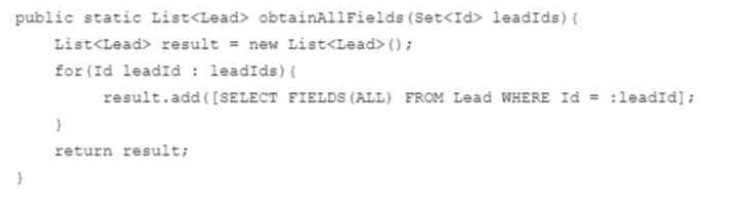
Consider the following code snippet:
Given the multi-tenant architecture of the Salesforce platform, what Is a best practice a developer should Implement and ensure successful execution of the method?
Correct answer:
D. Avoid performing queries inside for loops.
Explanation:
The provided Apex code performs a SOQL query inside a for loop, which is a well-known anti-pattern in Salesforce development due to its governor limits.
In this code:
for (Id leadId : leadIds) {
result.add([SELECT FIELDS(ALL) FROM Lead WHERE Id = :leadId]);
}
A SOQL query is executed once for each lead ID.
If leadIds contains more than 100 items, it exceeds the governor limit of 100 SOQL queries per transaction, causing a runtime exception.
🔧 Best Practice Fix:
Use bulk querying instead of querying inside the loop:
public static List obtainAllFields(Set leadIds) {
return [SELECT FIELDS(ALL) FROM Lead WHERE Id IN :leadIds];
}
This executes just one query, no matter how many IDs are passed in.
❌ Why other options are incorrect:
A. Avoid executing queries without a limit clause
Not necessary when querying by specific IDs — the ID filter already limits the result.
B. Avoid returning an empty List of records
Returning an empty list is safe and standard if no records match — not a best practice violation.
C. Avoid using variables as query filters
Using variables (e.g., :leadIds) is best practice for dynamic and safe queries — this option is incorrect.
Question 8Choose 1
Which annotation exposes an Apex class as a RESTful web service?
Correct answer:
C.
Explanation:
The @RestResource annotation is used to expose an Apex class as a RESTful web service in Salesforce.
It allows you to define a custom REST endpoint
You can handle HTTP methods like GET, POST, PUT, and DELETE
You specify the URL path using urlMapping
🔍 Example:
@RestResource(urlMapping='/myService/*')
global with sharing class MyRestService {
@HttpGet
global static String doGet() {
return 'Hello from REST!';
}
}
❌ Why the other options are incorrect:
A. @AuraEnabled(cacheable=true)
❌ Used to expose methods to Lightning components (LWC, Aura), not RESTful services
B. @RemoteAction
❌ Used to expose Apex methods to Visualforce + JavaScript remoting, not REST
D. @HttpInvocable
❌ Not a valid Apex annotation (possibly confused with @InvocableMethod, which is used for Flows)
TopicUser Interface
Question 9Choose 1
Universal Containers has developed custom Apex code and Lightning Components in a Sandbox environment. They need to deploy the code and associated configurations to the Production environment.
What is the recommended process for deploying the code and configurations to
Production?
Correct answer:
A. Use a change set to deploy the Apex code and Lightning Components.
Explanation:
Change Sets are the recommended and declarative way to migrate metadata (including Apex classes, triggers, Lightning Components, and configurations) from a Sandbox to Production when both environments are connected via Salesforce Deployment Connections.
They are user-friendly and do not require coding expertise.
They support a wide range of metadata types, including custom objects, profiles, and Lightning components.
B) Force.com IDE is outdated and no longer recommended by Salesforce.
C) Ant Migration Tool is a legacy tool (XML-based) and requires scripting knowledge, making it less efficient for simple deployments.
D) Salesforce CLI is powerful but is more suited for DevOps/CI-CD pipelines and requires technical expertise. While it can deploy metadata, it is not the simplest option for basic deployments compared to Change Sets.
Key Consideration:
If Universal Containers is using source-driven development (DevOps), then Salesforce CLI (Option D) would be more appropriate.
However, since the question asks for the recommended process (without specifying DevOps), Change Sets (Option A) is the best answer for most standard deployments.
Question 10Choose 1
Universal Containers wants to ensure that all new leads created in the system have a valid email address. They have already created a validation rule to enforce this requirement, but want to add an additional layer of validation using automation. What would be the best solution for this requirement?
Correct answer:
C. Use a before-save Apex trigger on the Lead object to validate the email address and display an error message If it Is invalid
Explanation:
C. Use a before-save Apex trigger on the Lead object to validate the email address and display an error message if it is invalid.
A before-save Apex trigger is the most effective solution for this requirement. It executes before the record is saved to the database, allowing you to validate data and prevent the record from being created or updated if the validation fails. Triggers can display a user-friendly error message directly on the page, which is a powerful way to provide immediate feedback to the user. This approach also works for all methods of record creation, including the user interface, data imports, and APIs, ensuring the validation is applied universally. This method is an excellent way to add an "additional layer of validation" to an existing validation rule.
❌ Why the Other Options Are Incorrect?
A. Submit a REST API Callout with a JSON payload and validate the fields on a third-party system.
While you could perform an API callout from Apex, doing so in a before-save trigger is not allowed. Callouts must be made from asynchronous Apex (future methods or queueable Apex) or after-save triggers, and they don't block the DML operation. You can't use an API callout to prevent a save from happening.
B. Use an Approval Process to enforce the completion of a valid email address using an outbound message action.
An Approval Process is designed to require a record to be approved before it can be finalized. It's not a direct data validation tool that prevents a record from being saved. An Outbound Message is an action that sends data to an external system, but it cannot be used to display an error message on the Salesforce record page or prevent the record from being saved.
D. Use a custom Lightning web component to make a callout to validate the fields on a third-party system.
This solution is not comprehensive enough. A Lightning Web Component (LWC) would only enforce the validation when a user is creating a lead via that specific component. It would not apply if a lead is created through a different method, such as a standard page layout, a data import, or an API call. For universal validation, a trigger is a better choice.
Experience the real exam before you take it
Our timed 2026 Salesforce Platform Developer practice test mirrors the format, number of questions and time limit of the official exam.
The #1 challenge isn't just knowing the material, it's managing the clock. The simulation builds your speed and stamina, so you walk in knowing exactly what to expect.
Build exam stamina: stay focused and accurate for the entire duration.
Master time management: learn to pace yourself so you never have to rush.
A new test every time: a randomised set from the Salesforce Platform Developer - Plat-Dev-201 question pool on every attempt.
Unlimited attempts: practice until you're 100% confident, not just once.
Study Smarter, Not Harder: Using Salesforce Platform Developer Practice Test as a Learning Engine
Understand the Plat-Dev-201 Exam Structure:
Familiarize yourself with the Salesforce Platform Developer exam format, including question types (multiple-choice, scenario-based) and key topics like Apex, Visualforce, and Lightning components. SalesforceExams Plat-Dev-201 Practice test mirror this structure, helping you adapt to the real exam.
Identify Knowledge Gaps:
Take a practice test early to pinpoint weak areas. Review incorrect answers to understand mistakes. Focus study sessions on these gaps, using Salesforce documentation or Trailhead modules for targeted learning.
Simulate Real Exam Conditions:
Take practice test under timed conditions to build stamina and reduce test-day anxiety. Mimic the exam environment—no distractions, no resources—to gauge your readiness accurately.
Analyze Results for Improvement:
After each test, review detailed explanations for every question, right or wrong. Note patterns in errors (e.g., coding syntax vs. conceptual misunderstandings) and adjust your study plan to address recurring issues.
Reinforce Learning Through Repetition:
Retake practice exam periodically to reinforce concepts and track progress. Space out sessions to leverage spaced repetition, which strengthens retention of complex topics like triggers or SOQL queries.
Supplement with Hands-On Practice:
Combine Platform Developer exam questions with real-world coding in a Salesforce sandbox. Build small projects (e.g., custom objects, Apex triggers) to apply concepts tested in practice exams, solidifying your understanding.
Leverage Community and Resources:
Join Salesforce communities on forums or Trailhead to discuss exam questions challenges. Share insights and learn from others approaches to tricky scenarios, enhancing your problem-solving skills.
Stay Consistent and Strategic:
Create a study schedule that balances practice test, review, and hands-on coding. Allocate time weekly to revisit weak areas, ensuring steady progress without cramming.
Salesforce Platform Developer certification is designed to validate your skills and knowledge in building custom applications on the Salesforce Platform using the core programmatic capabilities. By passing this Salesforce Platform Developer exam, you demonstrate your ability to leverage Salesforce’s declarative and programmatic tools to create secure, high-performance applications that meet evolving business requirements.
Key Facts:
Exam Name: Salesforce Platform Developer
Exam Questions: 60
Type of Questions: MCQs
Exam Time: 105 minutes
Exam Price: $200
Passing Score: 68%
Prerequisite: NO
Course Weighting:
Process Automation and Logic: 30% of Exam
User Interface: 25% of Exam
Developer Fundamentals: 23% of Exam
Testing, Debugging, and Deployment: 22% of Exam
Tips for Passing the Salesforce Platform Developer Exam
1. Apex and SOQL form the foundation of Salesforce development.
2. Know when to use Salesforce’s point-and-click tools versus custom code.
3. Be comfortable writing unit tests, handling exceptions, and adhering to recommended coding standards.
4. Keep Up with Platform Updates.
5. Salesforce Platform Developer mock test helps you identify knowledge gaps and improve time management. They also familiarize you with the question format, giving you confidence on exam day.
Salesforce Platform Developer practice questions build confidence, enhance problem-solving skills, and ensure that you are well-prepared to tackle real-world Salesforce scenarios.
Why Practice Makes the Difference
1. The Salesforce Platform Developer exam is not just about theory — it’s about applying concepts under pressure.
2. Our practice tests mimic real exam conditions, helping you prepare for both content and timing.
3. Detailed feedback shows why answers are right or wrong, so you improve fast.
4. Regular practice builds muscle memory, making you faster and more accurate on test day.
What Developers Say About Us
I failed Salesforce Platform Developer twice on my own. With these tests, I passed with 87% in 3 weeks!" – @CodeWithApex
"The Apex trigger scenarios were IDENTICAL to the exam. Lifesaver!" – @LWC_Dev
"I thought I was ready for the Salesforce Platform Developer exam after doing Trailhead, but the practice tests at Salesforceexams.com showed me where I was falling short — especially on governor limits and LWC events. The detailed explanations helped me improve fast. Thanks to these tests, I passed on my first try!"
David T., Certified Salesforce Platform Developer I
I wanted to pass the Dev 1 exam without wasting time on irrelevant materials. Salesforceexams.com delivered. Their practice questions focused on the Apex and testing concepts that actually showed up on my exam. First attempt success!
Alex Ramirez, Salesforce Developer | Miami, FL
✅ “Don’t just study — practice like a pro. Get your Salesforce Platform Developer practice questions today!”
5 Reasons Our Practice Tests Win
1. Real Exam Match – Questions mirror actual Salesforce Platform Developer difficulty & wording.
2. Weakness Finder – Identifies gaps in Apex, LWC, security before exam day.
3. Time Saver – Cuts study time by 50%+ (no wasted effort).
4. Pass Guarantee – Fail? Get free test extensions.
Salesforceexams.com - Trusted by thousands and even recommended as best Salesforce Platform Developer practice test.